
By John Gruber

All your customer
data in that nice
California sunnn.
Early access now!
- The NYT Seemingly Does Marissa Mayer Dirty ★
-
Alexandra Alter, in the lede for her profile of Marissa Mayer’s new AI startup Dazzle for The New York Times (gift link):
Late last year, Marissa Mayer was struggling with what felt like an impossible task.
Her daughter Marielle was turning 10, and Marielle’s teacher wanted three bullet points summarizing what made her special. Mayer — the former chief executive of Yahoo and a pioneer at Google, where she was the first female engineer — likes cracking a hard problem. But she felt overwhelmed by the range and complexity of potential answers.
So Mayer asked her personal A.I. assistant, Dazzle. Within a few seconds, Dazzle delivered an answer.
“It came back and was like, your daughter is empathetic, creative and an animal lover,” Mayer said. She thought it was perfect.
That anecdote is brutal. It makes it seem like Mayer has lost her mind. She’s getting roasted for it on social media. I suspected (and hoped) there was more to the story. There was. Here’s Mayer herself on X:
To be clear, I didn’t use Dazzle because I was overwhelmed by making a slide. I used it because summing up your child in a few bullets feels laughably limiting. And, since our team had just gotten an early prototype running, I wanted to see what deeper threads it might find.
She might just be hyping her startup. But she definitely didn’t tell The Times that she needed help from AI to remember that her own daughter is “empathetic, creative, and an animal lover”. She seemingly got done dirty by Alter and the Times on that use-case anecdote.
- Apple Issues Statement on iPhone Duo’s Crack Problem ★
-
Chance Miller, 9to5Mac:
Here is Apple’s full statement:
The response to iPhone Duo from early users has been incredibly positive, and we are seeing exciting things from developers who are rapidly updating their apps to take advantage of its unique form factor. We are aware of an issue impacting the inner display on a small number of iPhone Duo units. If users experience issues with their iPhone Duo display, they should contact AppleCare for a replacement.
The company says the problem affects a very small number of iPhone Duo units and appears to surface relatively quickly. Most iPhone Duo units are not affected. You do not need AppleCare+ to have your iPhone Duo replaced for this problem. If you bought from a carrier, you should contact AppleCare directly, not your carrier, to get your device replaced.
Did it cross Ternus’s mind to just say “You’re folding it wrong?”
(History doesn’t repeat, and in this case, it actually doesn’t even rhyme. Steve Jobs never told anyone they were “holding it wrong” with the iPhone 4 — he emailed a customer, “Just avoid holding it in that way.” But CNN went with the headline “Apple on iPhone Complaints: You’re Holding It Wrong” and that’s the line everyone wrongly remembers.)
- Glenn Fleishman on Apple Notes and Markdown ★
-
Glenn Fleishman, writing at Six Colors, “Why Notes Will Never Let Us Edit Markdown”:
The Notes app added Markdown import and export in the version 26 operating system releases, and the macOS 27 Golden Gate update lets us copy and paste as Markdown. Why can’t we just write natively in that hoary, simple format?
I use Markdown all day, every day. In fact, I’m writing these words in Markdown without you even knowing it. All content-management systems (CMSes) I’m aware of support native Markdown entries when posting, and many writing and note-taking apps integrate Markdown conventions without needing to trumpet them.
Fleishman not only ably describes why Apple Notes doesn’t support editing in Markdown syntax, but also why it shouldn’t. It is correct for Notes only to natively support WYSIWYG editing. Normal users should never ever be exposed to formatting codes. Also, Markdown, as a language, can be malformed. It should be impossible for users to create a malformed note in Notes. If you could edit in Markdown in Notes, you could create malformed notes. That’s just gross. I can say that. Markdown isn’t for everyone. And even for me — Markdown’s creator — I don’t want it in Notes, which is the notes app I use.
I think Apple has done a really good job in the last few years adding import/export and copy/paste support for Markdown to Notes. That’s the right way for Notes to support Markdown. My biggest complaint with Notes’s recent Markdown support — as noted by Fleishman — is that most of these features are only on the Mac, not iOS.
Apple Announces New A20 Pro iPad Mini
Monday, 26 October 2026
- Apple Newsroom announcement.
- iPad Mini (A20 Pro) product page.
- Tech specs page (PDF archive).
- iPad comparison page showing new A20 iPad Mini, previous A17 iPad Mini, and the 11-inch M4 iPad Air PDF archive].
- One-minute commercial.
Available in two colors, starlight and midnight (which does not seem very dark), and three storage capacities: 128, 256, and 512 GB. Pricing, with the previous-generation A17 Pro model for reference, both before and after Apple’s June 25 price hikes:
IPAD MINI                    128 GB   256 GB   512 GB
A20 Pro (new)                 $700     $800    $1000
A17 Pro (Q3 2026 price hike)  $600     $700     $900
A17 Pro (Q4 2024–Q2 2026)     $500     $600     $800
Notes:
Cellular adds $150 to any model.
The $100 nano-texture display option is new for the iPad Mini, and is only available with 256 or 512 GB storage.
Still stuck with Touch ID — a bummer in general, and a shit sandwich given how expensive these have gotten. Unless Apple decides to make a mini-sized iPad Pro (which I definitely do not expect), there’s no way to buy a mini-sized iPad with Face ID.
The display is now OLED, with inky-deep blacks and brighter brights. Max SDR brightness goes from 500 to 600 nits and HDR content goes to 1200 nits. This is the first iPad Mini with an XDR display. But: no ProMotion.
Support for Pencil Pro and Pencil USB-C. I still can’t believe the $2000 iPhone Duo doesn’t support the superior Pencil Pro.
The new Mini is thinner (5.4mm vs. 6.3mm) and lighter (255g vs. 293g for Wi-Fi models). The display is slightly larger (8.5″ vs. 8.3″) while the footprint shrank slightly, because the bezels have been reduced by 25 percent. The iPhone Duo weighs almost exactly the same (254g to be exact) but its inner display is only 7.6 inches diagonally.
The front-facing camera moves from the short side to the long side. All current iPads now have the camera on the long side.
The new iPad Mini introduces what Apple calls the Acoustic Display: “custom tweeters and woofers are now hidden beneath the glass and enclosure, delivering a rich, personal audio experience.” This change helped Apple achieve IP67 dust and water resistance, best-ever for any iPad model.
One last point. The previous iPad Mini launched two years ago, in October 2024, but had the now-three-year-old A17 Pro chip from the 2023 iPhone 15 Pro. Today’s new iPad Mini launches with the brand-new A20 Pro chip that debuted with last month’s iPhone 18 Pro and last week’s iPhone Duo. ★
Monday, 26 October 2026
- A Simple Two-Step Shortcuts Shortcut Lets You Lock the iPhone Duo When You Close It ★
-
Federico Viticci:
Don’t like that the iPhone Duo doesn’t auto-lock when you close it?
You can fix it with this simple Shortcuts automation.
Two steps:
- A conditional for when the iPhone is
Closed. - Lock the screen.
I mentioned in my review that I kept closing the Duo expecting it to lock, like when closing a book (or a laptop, for that matter). And it didn’t occur to me that I could simply add this feature via Shortcuts. That’s cool. But I also mentioned in my review that I wouldn’t want that to happen every time I closed it. Sometimes you do want to just switch from the wonderful inner display to the miserable little outer display, and the last thing you want when you do that is to need to re-authenticate for the hundredth time of the day with Touch ID. It was just a wrong instinct I had, and I broke myself of that instinct after about a week or so of full-time Duo use. I stopped expecting it to lock on close. So while I think this shortcut is worth pointing out — and I especially think it’s a good reminder to think about Shortcuts when you find yourself wishing for features that aren’t in Settings — I recommend trying to break yourself of this habit if you have a Duo and find yourself with the same wrong close-to-lock instinct I initially had.
Update: Stephen Robles posted a clever version that only locks the Duo on close if it’s on the home screen; if any app is open, it stays unlocked. That’s much more tempting to try. (He includes that one in a whole video full of Duo tips on YouTube.)
- A conditional for when the iPhone is
- Tiny Computers for iPhone Duo ★
-
If you’ve got or get a Duo and don’t try this out, you’re not hooked up right.
Sunday, 25 October 2026
- Sunnny ★
-
My thanks to Sunnny for sponsoring last week at DF. Sunnny’s pitch to B2B companies is simple: you store valuable customer information across a myriad of systems, making it hard to get a simple overview. Sunnny consolidates your customer data, cleans it, resolves identities, identifies relationships, and presents it neatly for you, your team, and your AI model.
Early access is open now.
- Duo Users Are Registering the Base of Their Index Finger as a Touch ID Coping Strategy ★
-
Some guy on Reddit (with an illustration video):
Saw this online, tried it, and it works beautifully. Basically, I registered the lowest part of my right index finger. That part of the finger sits naturally when you go to swipe up at the phone.
This resolves a major issue I had where I couldn’t easily just look at my phone to glance through notifications on the lock screen. Now, it’s never been easier (shown at the end of the video).
This is arguably better than Face ID. The speed is up there, and the phone doesn’t need to be facing directly at you to unlock, this motion can be done as soon as you pick up the phone.
Tim Hardwick at MacRumors quotes the “arguably better than Face ID” line.
This idea is clever, and it does seem to work if you grip the Duo just right, but the idea that this is better than Face ID is a joke. Copium is a strong drug but it wears off quickly.
- The Talk Show: ‘Lubricate the Inside of the Hinge’ ★
-
Special guest: Joanna Stern.
Special topic: The iPhone Duo.Sponsored by:
- iPhone Portrait Mode, 10 Years In ★
-
Speaking of Johnnie Manzari, he wrote a post yesterday marking the 10 year anniversary of Portrait Mode:
Initially, Portrait mode was seen as a giant math problem. You’d do disparity calculations on the two sensors and output a depth map. The problem was this approach feels and looks digital; it feels fake. In areas without texture, it’s impossible to do this calculation. In areas with ultra fine detail, a lower resolution depth map leads to terrible transitions and a full resolution depth map takes forever to compute. One solution would be to reduce the amount of bokeh so the issues are not as obvious. But then you lose the whole point of the feature, which was to make it look like you had a large, wide-open lens.
The solution to this conundrum — the tradeoff between artifacts and the amount of blur — was quite elegant, but it took a while to stumble across. There’s a saying in painting that if you get the eyes right, nothing else matters. Inspired by this principle from oil painting, the idea was to make sure we never got the eyes wrong.
I remember getting the call to test out portrait mode before its release. The marriage of history, art and computational science that came together to make this possible is still incredible to me to this day.
Saturday, 24 October 2026
- Nicole Nguyen’s Duo Review for the WSJ ★
-
Nicole Nguyen (also with a 5-minute video), writing for The Wall Street Journal (gift link):
Every time I used the Duo in phone mode, one-handed, I felt its heft. It’s wider and thicker than a Pro iPhone — and heavier, even compared with competing foldables. My hand actually hurts after using the Duo nonstop, straining to grip the device securely while trying to reach the far edge of the screen.
An Apple spokesman pointed to the Duo’s titanium frame for durability. Other folding models use a lighter aluminum. The company also moved the dock and common controls to the right to be more reachable (sorry, southpaws). Still, there were plenty of instances where my thumb found its limits: turning off the flash in the camera app, or typing the letter “A.”
There are people who can easily use two hands and won’t see this as a problem, including train commuters, frequent fliers or parents who wait around for kids to finish their activities. For me, I look forward to the day the Duo is lighter and thinner — maybe folding to the size of a deck of cards, like in the movie “Her.”
Interesting that she’d prefer a smaller Duo, not a bigger one, if Apple makes a second size. I agree that one-hand-ability is a problem with the Duo, but I also think the front screen is already too squat in terms of how much content it shows. I just think it’s the nature of foldables that they’re two-handed devices, even closed.
Her’s deck of cards foldable isn’t what I think we need to wait for. It’s Westworld’s super-thin trifolds — or even a bifold that’s more along those lines of thinness.
- Reuters and the WSJ on the Duo Launch ★
-
Aditya Soni, Christine Chen, and Will Russell, reporting Friday for Reuters:
CEO Ternus played greeter at a store in Austin, Texas, throwing open the doors and high-fiving customers as they streamed in, a video posted on X by CBS Austin showed. A known car enthusiast, Ternus’s Austin visit coincides with this weekend’s Formula 1 US Grand Prix in the city, with Apple holding exclusive US broadcast and streaming rights to the racing series.
I was wondering why Ternus and retail chief Deirdre O’Brien were in Austin for the launch. Joz held down the fort and held court at the Fifth Avenue store.
Regarding reviews:
They also said the folded Duo is less handy for the quick tasks most users do daily and several prominent reviewers recommended against it for many Apple customers.
“It’s been a lot of fun trying the Duo out for a week, but it feels like I’ve gotten to use an extraordinarily polished prototype — not a finished product that I’d want to buy and carry,” wrote longtime Apple commentator John Gruber.
Tech commentator Marques Brownlee said in a YouTube review that for a regular person who mostly texts and browses, “it is probably a no. But if the $2,000 doesn’t mean much to you, and you like the idea, after the learning curve and getting used to not having facial identification, it is a really fun phone.”
In Berlin, YouTube content creator Patrick Wolter was impressed that the Duo works as a phone and an iPad in one.
Not sure Wolter set a high bar there.
Reporting for the WSJ (gift link), Rolfe Winkler quoted yours truly as well, with (IMO, and I feel I get to have an opinion here) a better line from my review:
“The outer device is, by far, the worst iPhone Apple has ever made. It’s a miserable fat little thing. The inner device is a splendid, joyful, beautiful tablet,” wrote John Gruber, a well-known Apple blogger, in his review. “The decision of whether you might want to buy a Duo is not easy, because only one of its two selves is good.”
- Marion Barry Meets the iPhone Duo ★
-
Jay Peters, The Verge:
The iPhone Duo officially goes on sale today, but a few units already have broken screens. According to posts on Reddit about the affected units, the issue appears to be happening at a similar spot on all of them: Some kind of problem shows up on the inner screen along the hinge and a strange bright line (or lines) across the right side of the display.
This crack problem doesn’t seem to be widespread, but it’s seemingly more than a handful.
- MKBHD’s Duo Review ★
-
Marques Brownlee thinks the lack of Face ID will be the biggest gripe. I agree. And I love his central framing for the review: that the Duo is extremely polished around the edges (figuratively, but also true literally) but rough in the middle.
But he spends more time griping about third-party apps that haven’t been optimized for the Duo than most other reviews, because he oddly seems to personally rely on a lot of apps from shitty iOS developers, like Discord and Google Calendar. I get it, Google Calendar is very popular. So too is Discord — it’s #6 in the App Store today for the “social networking” category. And I get it, Brownlee splits his time across iOS and Android. But Google is a notoriously terrible iOS developer. Every time there’s a major hardware display transition on iPhones that requires developer support, most of Google’s apps are late. And whatever the reasons for Discord’s popularity, it’s sure as shit not the quality of its app.
The best apps for the Duo are the best apps for iOS generally: ones that are exclusively for iOS. (And Brownlee sings the praises of several of them, too, like Carrot Weather.)
- Tim Pan’s iPhone Duo Review ★
-
I hadn’t heard of Tim Pan or Mediastorm until running across his 24-minute video review of the Duo. It’s a good and fair review, but what struck me are the rather astonishing production values. Amongst other things, they stress-tested the hinge with an industrial robot by opening/closing it 10,000 times. (That’s less than one-third the folds tested by Joanna Stern’s Hingey, but still.) It’s an incredible piece of work, especially given the one-week time constraint. English is Pan’s second language, and there’s an entire alternate version of the whole review, under the Mediastorm channel, in Chinese. It’s not just a different soundtrack — it’s an entirely separate cut of the video, where all his on-camera shots are spoken in Chinese.
At about 7:30 in the (English) review, Pan mentions that they (he?) offer every employee in the company a new iPhone each year. This year’s choices, by employee count:
- iPhone 18 Pro: 17
- iPhone 18 Pro Max: 41
- iPhone Duo: 140
The point of this in the review was to show how strong demand is for the Duo amongst Pan’s company’s Chinese employees. But what struck me is that the company has 198 employees. (Last year, he says, 150 chose the 17 Pro or Pro Max; only 1 chose the Air.) Pan’s YouTube channel includes interviews with Christopher Nolan and Hans Zimmer. I never heard of him before but he obviously didn’t come out of nowhere. (Perhaps this is only a function of how little YouTube content I watch.)
Pan only launched his X account this week. He posted the entire review video there, too, and it’s got 187,000 likes and 6,700 comments. As a promotion to launch his X account, he’s giving away 100 iPhone 18 Pros. Even if they’re base models purchased somewhere without sales tax, that’s $120,000.
Remarkable.
- Apple Built a Photo-Realistic Functional Original iPod for Apple Music’s 404 Page ★
-
It seems like this amazing Easter egg only launched yesterday, to celebrate the original iPod’s 25th anniversary. Exquisitely well done. More like this, please.
- Chan Karunamuni on the Duo’s Open/Close Translucent Transition ★
-
Chan Karunamuni, human interface designer at Apple, on X:
iPhone Duo is here! Excited to have worked on the design of our open/close transition. It’s designed to make the two displays feel like one seamless experience by perceptually bending the focal plane, not the content, so that it feels like opening a window onto a singular view.
Karunamuni thanks a few engineers by name, which is always good (and for Apple employees, far too rare) to see.
Johnnie Manzari, HI designer formerly of Apple, now at Google DeepMind, retweeting Karunamuni:
The second I saw that transition I thought “here’s the next ‘change the whole industry’ design from Chan”.
Previous such raise-the-bar designs that Karunamuni led or played a major hand in include the Dynamic Island in 2022, the “shockwave moment” when you put two iPhones together to initiate AirDrop or NameDrop in 2023, and iOS 18’s cool-ass Flashlight beam UI in 2024. He also gave Steve Lemay this full-throated public endorsement upon his promotion to lead all of Apple HI design upon Alan Dye’s departure for Meta last December.
Friday, 23 October 2026
- The Verge’s Duo Review: ‘Apple’s Folding Phone Is a Messy, Expensive Good Time’ ★
-
Nilay Patel and Allison Johnson (also: 26-minute video review on YouTube):
This means almost every time you open the phone you instinctively rotate it, and while it will work no matter how it’s rotated, it’s better to rotate it counterclockwise so the cameras are on top and the volume buttons are on the top left. Over our week of testing, this started feeling more natural, but it’s exactly the opposite of what you’d initially expect. It’s especially odd in Apple’s bumper case, which has a large notch to expose the Touch ID sensor and camera control, and it looks for all the world like it belongs at the bottom.
You might think this is a little thing, but it’s strange to find yourself slightly unsure of how to hold a smartphone. A nontrivial part of the Duo experience is just reorienting yourself to where the volume buttons are as you flip the thing around. When closed, they’re on top of the phone, but if you rotate the Duo clockwise, they end up on the bottom right, and it’s the top button that turns the volume down because they don’t change orientation with the display. There’s a buried setting in iOS that makes the volume buttons reorient themselves as you turn the Duo around; Apple needs to set it so it works right by default.
Completely agree with them on this — it seems inexplicable that with default settings, while holding the open Duo vertically, if the volume buttons are on the right, you press the up button to lower the volume and down button to raise it.
One other thing to get used to is simply unlocking the phone. Touch ID is integrated into the wake button on the side of the phone. There’s no Face ID at all, and it might take a minute to remember that when you stare at your phone for a beat and wonder why your notifications aren’t unfurling. Ask us how we know. But a week is long enough to get used to Touch ID life again, and it’s mostly painless once you remember you’re supposed to be using it.
Completely disagree with them on this — unless you wear an Apple Watch all day every day.
Re: the cameras, they make this interesting aside:
(It would be cool if you could switch the image preview to the other panel to use it halfway open like a waist-level viewfinder, but you can’t.)
This is a great opportunity for third-party camera apps. Imagine using the Duo in the L-shaped laptop pose, holding it at waist level, looking down — like a Hasselblad 500.
Overall Patel and Johnson are fair and astute, but far more positive about the iPhone Duo than me or Joanna Stern. Don’t get me started on The Verge’s 10-point ratings scale, but they scored the Duo a 7/10, and only gave last month’s iPhone 18 Pro an 8/10. Based on this description of their scale, I’d give the 18 Pro a 10/10 (“best of the best”) and the Duo a 4/10 (“mediocre — has multiple outstanding issues”).
- Joanna Stern Reviews the Duo: ‘The Good, the Bad, and the Buggy’ ★
-
Joanna Stern’s video review packs a ton into 16 minutes. She commissioned a custom robot to fold/unfold the thing over 32,000 times in a week, to see if it loosened the hinge. (I won’t spoil the answer.) She took it on a yacht on the Hudson. She took it to a dark bar to test the cameras. And she really, really missed Face ID. I don’t know how she makes these videos in just a week, along with all the actual testing. So good.
We rank our complaints (and praise) in different order, but overall her take jibes with mine on every single point. You can read a version of her review, too, if you’re a subscriber to The New Things, which you should be.

Thursday, 22 October 2026
- Apple Highlights 50+ iPhone Apps That Have Already Been Optimized for the Duo ★
-
Apple Newsroom:
New editorial collections for iPhone Duo apps and games will go live on the App Store this Friday, with additional app updates rolling out throughout the year. Apps optimized for iPhone Duo are easy to identify with a Made for iPhone Duo badge on product pages across the storefront.
This story highlights dozens of apps that have been optimized. This sort of transition happens every time Apple introduces a major screen change. It happened with the iPhone X in 2017, it happened when the iPhone 6 added a Plus size, it happened when the iPhone 5 changed the aspect ratio from 3:2 to 16:9, and, most memorably of all, it happened when the iPhone 4 went retina. Every time this happens it sucks to some varying degree of suckiness to use apps that haven’t been optimized. And soon enough, all apps still under active development get updated.
Developers know that iPhone users care how apps look and work. iPhone users will switch to competing apps for something like this. I stopped checking Mastodon on my phone for the last week and half because Ivory isn’t optimized. I stopped reading my messages on Signal — I just wait until I’m back at my desk. If I bought a Duo, I’d literally stop using Signal if they don’t update their app soon. Life’s too short to use shitty apps. iPhone developers get that.
Out of all those transitions I listed above, my gut feeling is that there are more third-party apps ready to go on day one for the Duo than for any of those previous transitions. No, it’s not all apps. Some of the apps that aren’t yet updated are quite popular, and others are ones that users can’t easily just switch away from (like, say, your bank’s app). But developer support is not a problem for the Duo. If anything the launch of the Duo has exemplified better than any event in iPhone history just how different the iPhone and Android developer communities are. “Flagship” Android foldables have been out for over 7 years and developer support for them today remains nothing close to developer support for the Duo — and the Duo doesn’t even launch until tomorrow.
- Updates to My iPhone Duo Review ★
-
Nothing major, but since publishing at 7:00pm last night, I’ve made a few additions and changes to my iPhone Duo review. I’m calling them out here, so that if you’ve already read it, you can see the changes. If I make more, I’ll add them to the top.
Regarding the camera, added and/or clarified the following (in bold):
As for the camera itself, it’s terrific. It’s clearly not of the same caliber as the iPhone 18 Pro, but it’s good. The technical specs of the Duo’s main 1×/2× camera are nearly identical to those of the year-ago iPhone Air, and I love the iPhone Air’s camera. If anything, the Duo’s camera should be better, because it gets the year-better A20 Pro imaging pipeline. Which, notably, brings support for the same new Photographic Styles, including textures like film grain, that were introduced with the iPhone 18 Pro. However, the Duo is not “Pro” — it does not get camera features like “Pro controls” (variable lens aperture, shutter speed, white balance, histogram), Apple Reference Image, spatial video, ProRES (video or RAW), or Apple Log. Apple’s “shot with iPhone” keynotes will continue to use iPhones Pro.
Also, notably different from the Air, the Duo has an ultrawide 0.5× second camera lens. This brings both the ultrawide perspective and macro photography. Like the Air, the Duo’s main 1× camera has a minimum focus distance of 15cm. That’s closer than the 17 and 18 Pro cameras (20cm), but there are a lot of times you want to snap photos of receipts or documents closer than 15cm. With the Air, you can’t focus closer than 15cm, because it only has that one camera. With the Duo, you can focus on subjects down to just 2cm away, using the 0.5× lens or the 1× lens in “macro” mode (which switches to the ultrawide lens but sensor-crops to the 1× field of view).
Regarding the security of “Unlock with Apple Watch”, I added this note:
(It’s worth noting that the wrist tap on your watch for this gives you a button to tap to lock your iPhone immediately — it’s not just a notification that it happened, it presents you with an action to undo it.)
Added this note (in bold) about it occasionally rotating (uncomfortably) in pocket, because it happened to me again twice today:
It does not go into or out of my jeans pocket smoothly. Sometimes, in my pocket, it rotates 90 degrees, which is uncomfortable. Folded up it never stops feeling heavy. It is heavy, compared to other iPhones.
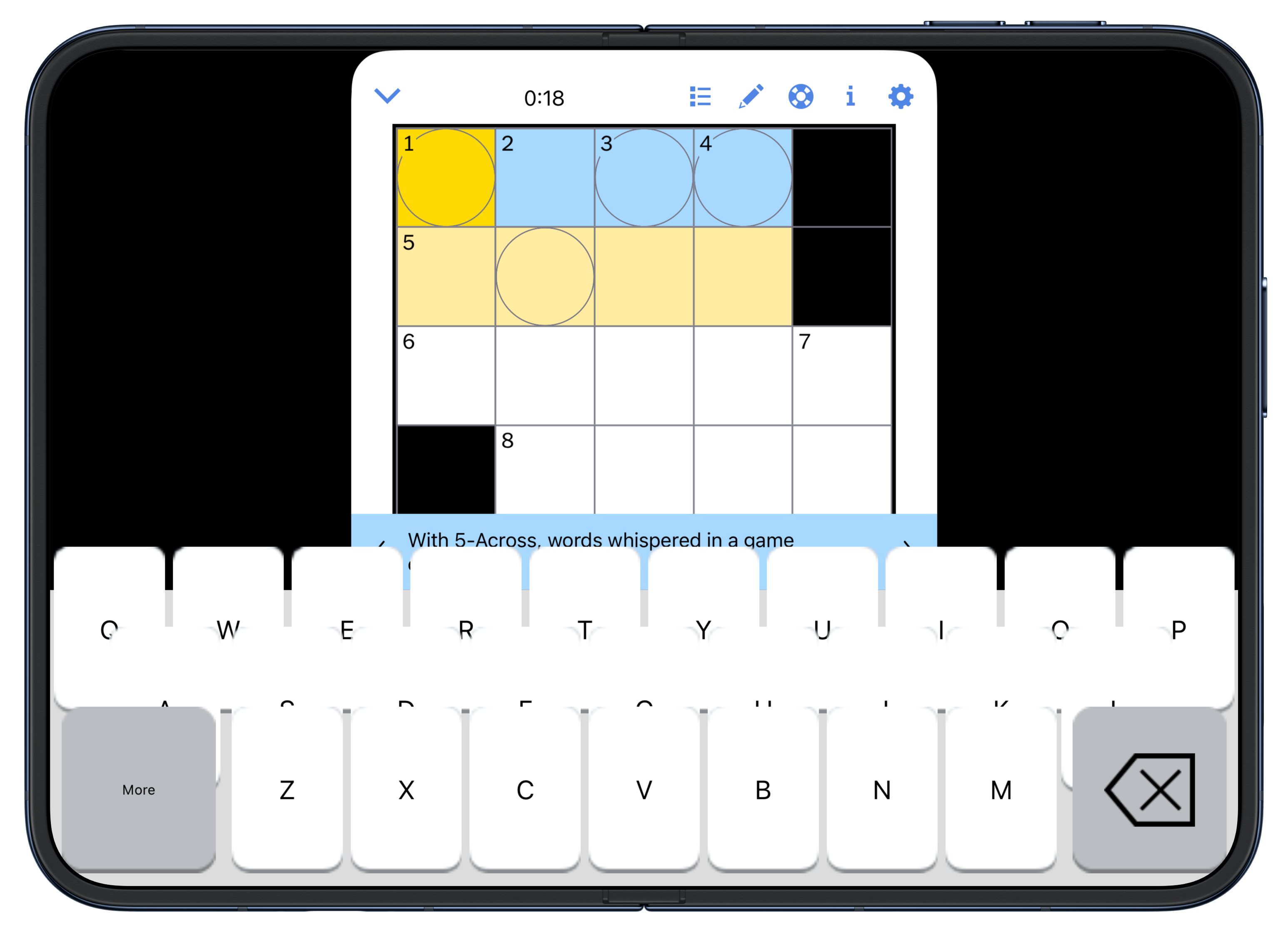
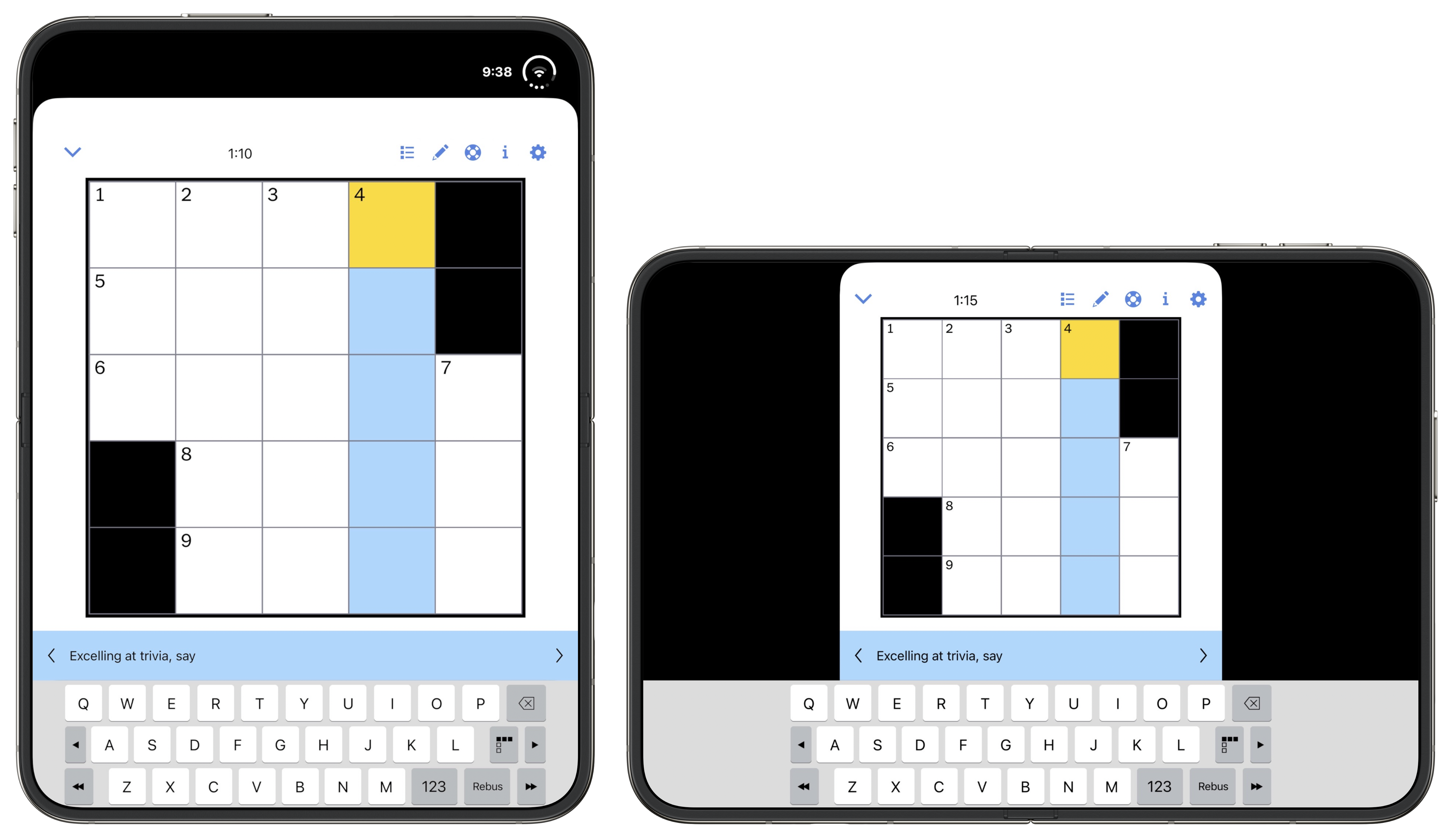
Added this updated regarding the janky crossword keyboard in the NYT Games app on the Duo’s inner screen:
[Update, Thursday: One day later and there’s an updated version of the NYT Games app, and they’ve fixed the orthodontic mess of their crossword keyboard, in both orientations. Screenshot. This goes to show just how fast the Duo-optimized updates are streaming in from developers. My review was up-to-date when I published at 7:00pm ET Wednesday, and outdated by the time I woke up Thursday morning.]
The iPhone Duo
Wednesday, 21 October 2026
The very nature of the iPhone Duo raises numerous obvious questions about what it’s like to use. Does it not feel thick and heavy, awkward both to pocket and unpocket? Doesn’t the outer (cover) screen feel small and cramped, with an unfamiliar squat-rather-than-tall layout for UI controls in every app you use? Isn’t it weird that when you open it up to use the inner screen, that all the hardware buttons on the edges of the device are in the “wrong” places for a tablet? For anyone who’s gotten used to Face ID over the last decade, is it not frustrating to go back to Touch ID? And what about third-party apps that haven’t been updated to support the Duo’s novel displays — do they not suck to use?
Clearly, the point of a Duo review is to answer these questions, which really boil down to one question: How did Apple solve these problems?
The answer is: They didn’t.
All of these problems are real, and each of them detracts from the experience of using the Duo. Some of them have been mitigated through thoughtful design and clever engineering. Some of them might be solved in future iterations of the device. Some of them, though, I believe are endemic to the very idea of a foldable, and cannot be solved.
The Duo name is perfect. It truly is like having two devices in one. The outer device is, by far, the worst iPhone Apple has ever made. It’s a miserable fat little thing. The inner device is a splendid, joyful, beautiful tablet, with a UI that out-iPads the iPad. For me, by far, it’s my favorite tablet experience ever. I prefer it to any iPad or Kindle-like reader I’ve ever used.
So I’ll cut to the chase. The decision of whether you might want to buy a Duo is not easy, because only one of its two selves is good. You might be delighted, despite its clear compromises, if what you value most is a pocketable small tablet and are ambivalent about your iPhone. You might be endlessly frustrated if you love your iPhone, and use it extensively, often for quick interactions throughout the day, every day.
More Than Meets the Eye
I was a kid when Transformers hit the toy market. I had a few — every boy my age did — but I was more of a GI Joe kid. It always bothered me that, as toys, Transformers were clearly compromised in both states. Folded up, they weren’t good cars / trucks / fighter jets. They had obvious seams and folds. In the cartoons — and the subsequent live action films decades later — the Transformers’ disguised states are seamless. In real life with the actual toys, the disguised states were about as convincing as a pair of Groucho glasses. A regular toy car looked like a real car, and stayed together no matter how hard you played with it. A Transformer car never quite looked like a real car and would come apart when played with. Unfolded, they looked like robots, yes, but they had obvious compromises. And it was kind of a pain folding them back into vehicles. My recollection is that we played with them a lot more as unfolded robots than as folded vehicles.
And that’s what they were. They weren’t vehicles that pretended to be robots. They were robots in disguise. The Duo isn’t really a phone. It’s a tablet in disguise. And in the same way that a true toy car was a better toy car than a folded-up Transformer-as-car could ever be, the Duo-as-phone is just not as good a phone as any regular iPhone. Honestly it’s not even close.
Consider if you could snap the Duo in half, leaving the smaller outer display as a standalone iPhone. Would anyone want an iPhone this shape and size? I think the answer is that zero people would want this. The iPhone Mini, back in 2020 and 2021 with the iPhone 12/13 generations, proved not to be popular enough for Apple to keep around. The iPhone Minis were a way better shape than the outer Duo. There’s a reason why the iPhone Air is not shaped like half a Duo — because the Duo shape stinks as an iPhone. And that’s only considering the hypothetical of a thin lightweight Duo snapped in half. In real life, with the actual Duo, when you use it folded up the device is twice as thick and twice as heavy. These Transformer watches were a fun way to smuggle a toy robot into school, but they were crummy watches. The iPhone Duo is a fun way to fit an entire iPad Mini–sized tablet into your pocket, but it’s a cumbersome phone.
It does not go into or out of my jeans pocket smoothly. Sometimes, in my pocket, it rotates 90 degrees, which is uncomfortable. Folded up it never stops feeling heavy. It is heavy, compared to other iPhones:
| iPhone | Weight |
|---|---|
| Duo | 254g |
| 18 Pro Max | 249g |
| 18 Pro | 211g |
| 17 | 177g |
| Air | 165g |
It’s technically only negligibly heavier than an 18 Pro Max, but because it has so much less surface area, it feels far more dense. If it did not unfold, no one would buy this.
But, of course, it does unfold. That’s the entire point. Unfolded, it not only no longer feels heavy, it feels featherweight light. It’s uncanny. An open iPhone Duo has a 7.6-inch display and the physical dimensions are 4.6 × 6.5 inches. An A17 Pro iPad Mini (the current model, but supposedly not for long) has an 8.3-inch display, measures 5.3 × 7.7 inches, and weighs 297g (that’s the cellular model’s weight, which is only fair). The iPad Mini has a slightly bigger screen but it’s heavier. In hand, I prefer the unfolded Duo over the iPad Mini as a tablet, in every single regard other than hardware button placement. (More on that below.)
You simply cannot have your cake and eat it too. The Duo allows you to take what is, in several ways, the best tablet Apple has ever made — and thus, the best tablet any company has ever made — fold it in half, and put it in your pocket to carry everywhere. While folded in half, you can use it as an entirely functional iPhone, but it’s by far the worst iPhone experience ever — frustrating, ungainly, and uncomfortable.
Using the Duo Closed, With the Outer Display
Ever since it was unveiled there’s been idle speculation that, while folded, the Duo’s design is biased against left-handed users. First, because the Touch ID side button is on the right. Second, because the Duo variant of iOS moves things like application toolbars and the home screen Dock to the right.
I am right-handed, but I’m a little bit on the ambidextrous spectrum. For example, I switched to using my mouse with my left hand around 1995, when I developed RSI in my right wrist, and I’ve used my mouse left-handed ever since. (But I use a MacBook trackpad with my right thumb.) I can shoot a basketball from close range with my left hand. So going into my Duo review, I thought I’d try to use my Duo as a pretend lefty. Turns out I didn’t have to pretend. I never realized this, but I naturally use my iPhone left-handed quite a bit throughout the day. For example, while brushing my teeth. I keep my iPhone in my right front pants pocket, but I often pick it up off my desk or kitchen counter and use it left-handed.
The Duo is not comfortable left-handed. The problem isn’t the Touch ID side button — I fixed that by registering my left index and middle fingers with the Touch ID sensor. The problem isn’t right-side bias for toolbars and the Dock in iOS Duo.1 That’s not great for left-handed use, but the truth is there’s a reachability problem no matter which single hand you try holding the Duo in. It’s better to hold it in your right hand than left, reachability-wise, but fundamentally it’s so wide that it’s a two-handed device even when being used folded.
No, the problem with holding the Duo in your left hand alone is that the bottom left corner of its D-shaped frame digs into your palm. When you hold it in your right hand, it’s a nice round corner in the meat of your thumb’s base. In your left, it’s a crisp sharp corner, and it doesn’t feel good.
When using the small outer display, everything on screen feels cramped. I don’t even like the home screen. Moving the Dock to the right side breaks 19 years of spatial memory for me.2 I keep reaching for Messages, Notes, and Safari down at the bottom of my screen, when now they’re over on the right. And they look weird too, because they’re smaller icons than the others on the home screen. Ostensibly the Dock is for your four most-used apps, but now they’re the smallest icons on your home screen? What sense does that make?
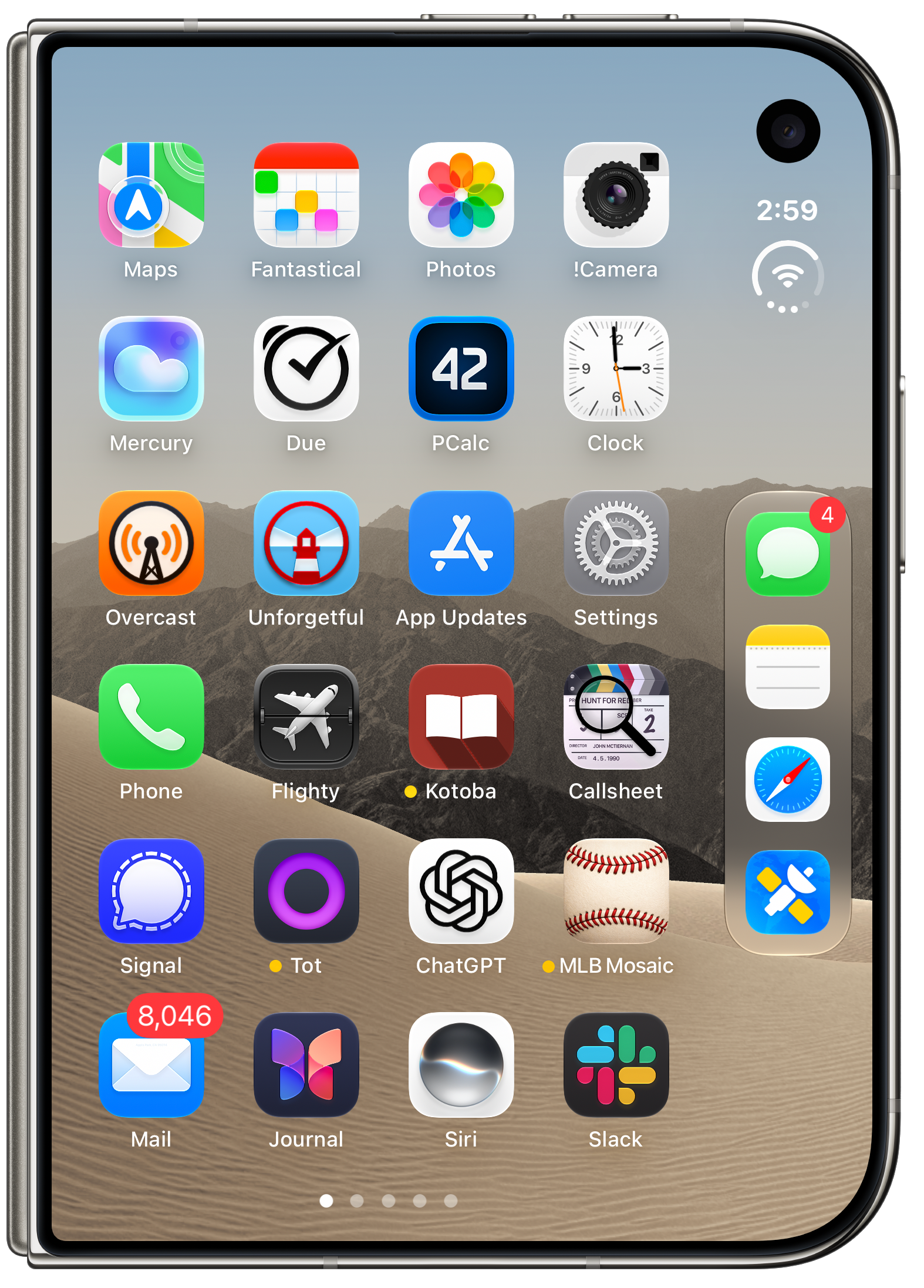
It’s such a little thing (no pun intended, I swear), but it exemplifies how many compromises Apple had to make for this small squat display.
Next, consider this screenshot from NetNewsWire:
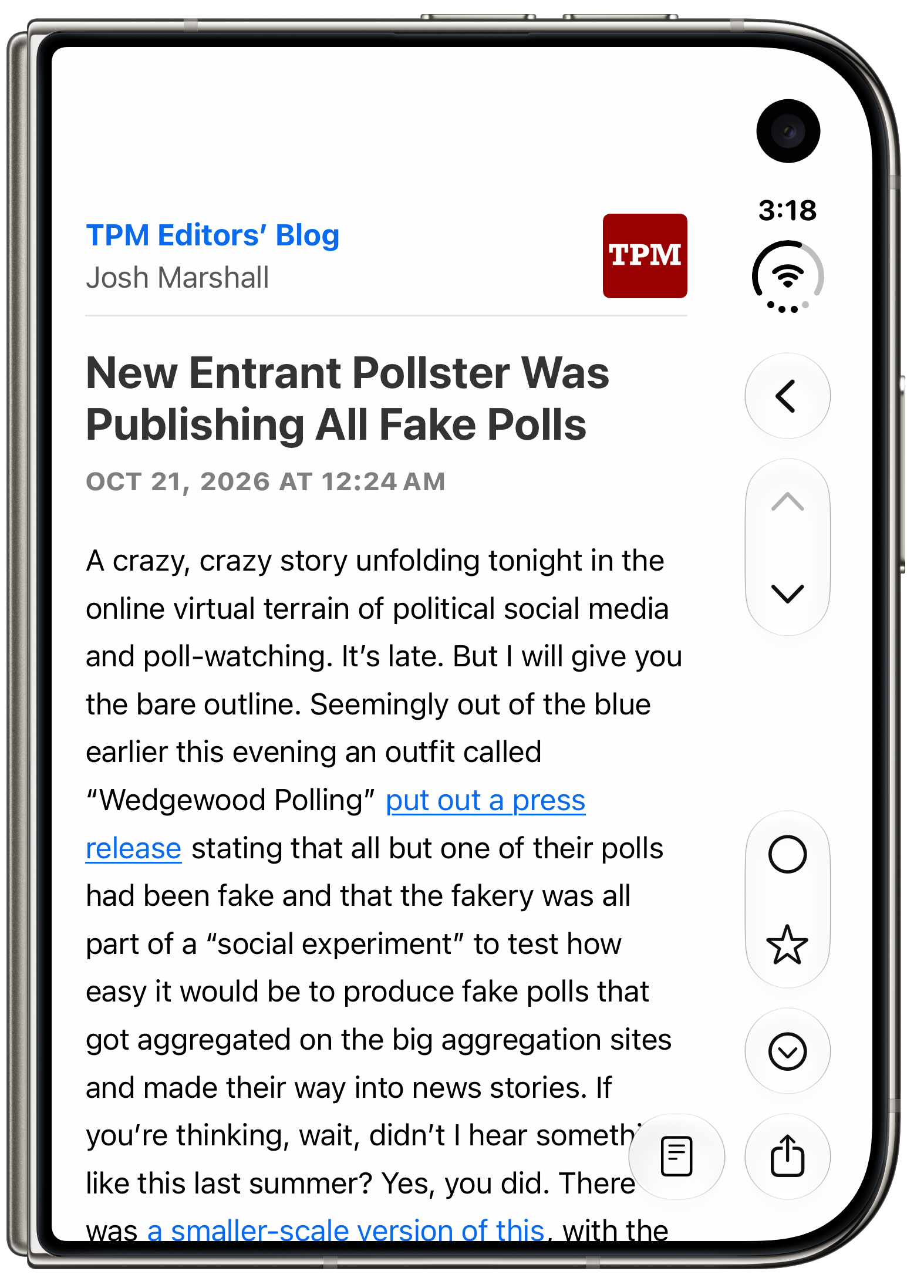
What gets me here is the chevron “❮” back button being on the right. The iPhone’s back buttons have always been at the top left of the screen because iOS has always used a left-to-right column-view inspired spatial hierarchy. Craig Federighi just explained this spatial metaphor beautifully in a short YouTube interview a month ago. This metaphor is foundational to the iPhone experience. The back button is on the left because you go back to the left. Putting a button that takes you to the left on the right side of the screen just feels wrong. I think if I used an iPhone Duo every day for the next year (please no) I would still think this felt unnatural. It’s like having a turn signal stalk in your car that you move in the opposite direction that you turn the wheel. Now, it’s true that you can swipe from the left side of the screen to go back. You don’t have to use the “❮” button. But that button is there, in every single iPhone app that presents content in a hierarchy. And it’s always on the wrong side of the screen (unless you’re using an app on the left side of split screen multitasking — see below).
Here’s another example. Unforgetful is Marco Arment’s new reminders app. I like it a lot, and have been using it extensively since the summer. It’s properly updated to support the Duo UI layout. Here’s what it looks like when you’re creating a new task, normally:
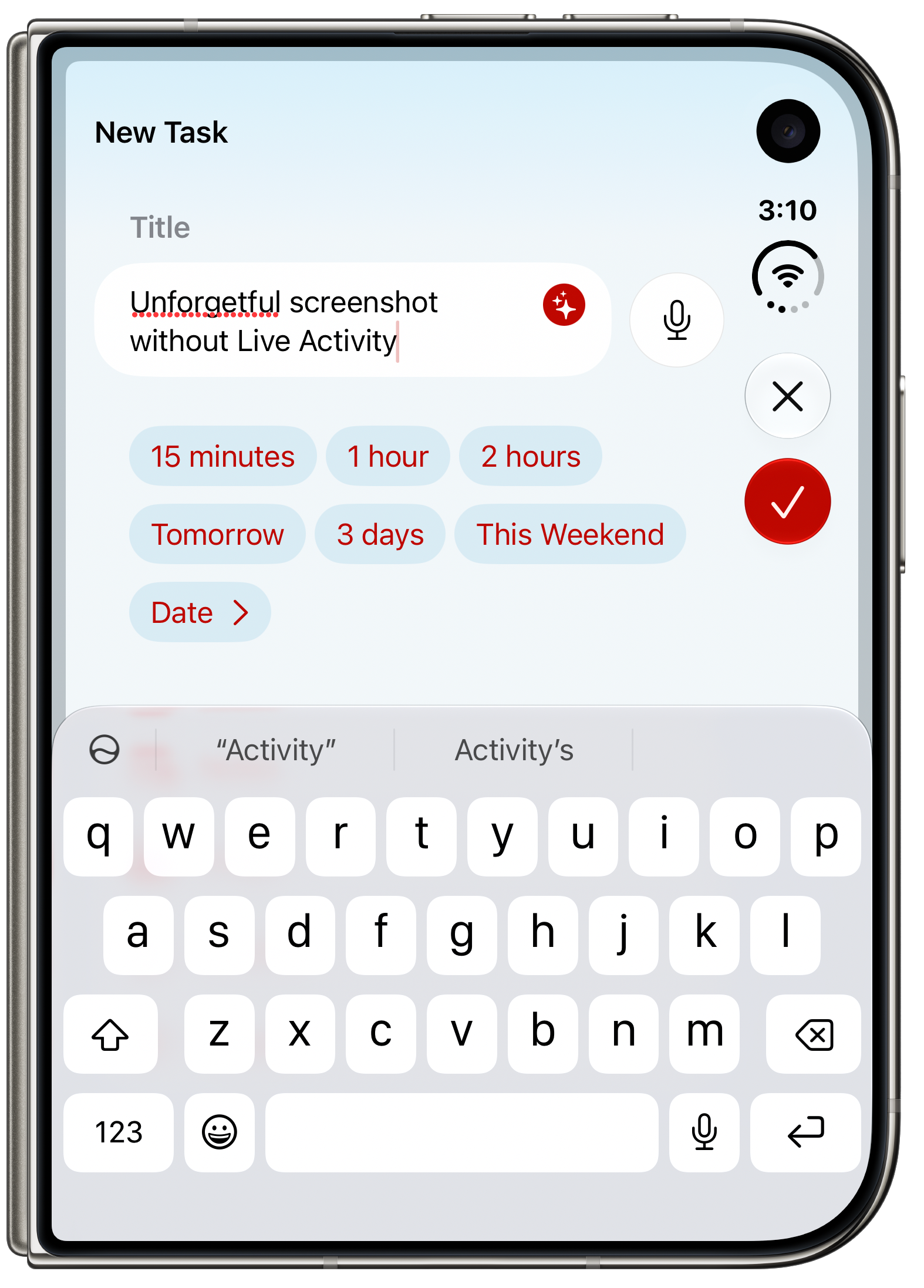
But here’s what I saw over the weekend, when I was out running a Vonnegut errand, listening to The Vergecast:
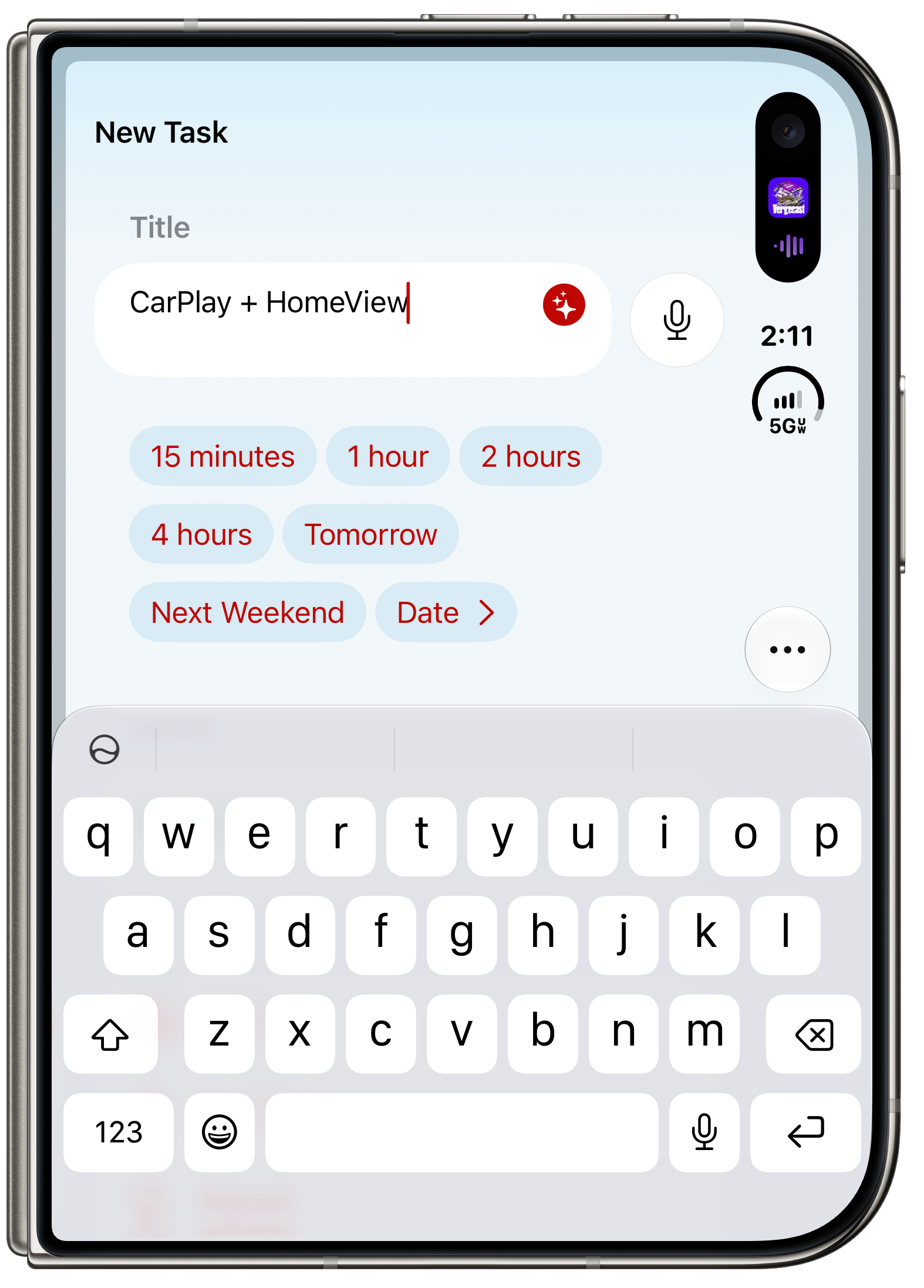
I spent almost an entire minute trying to figure out how to save this task. I was about to text Arment with a bug report, that new tasks were unsaveable on the Duo, when I realized what happened. Because I had a Live Activity showing for the podcast I was listening to (in Arment’s Overcast, natch), the system’s time and circular status indicator were pushed down, reducing Unforgetful’s toolbar area, which meant the two buttons, “✕” and “✓” (for Close and Done, respectively), were collapsed into a single “···” overflow button. Tapping the dot-dot-dot button reveals them:
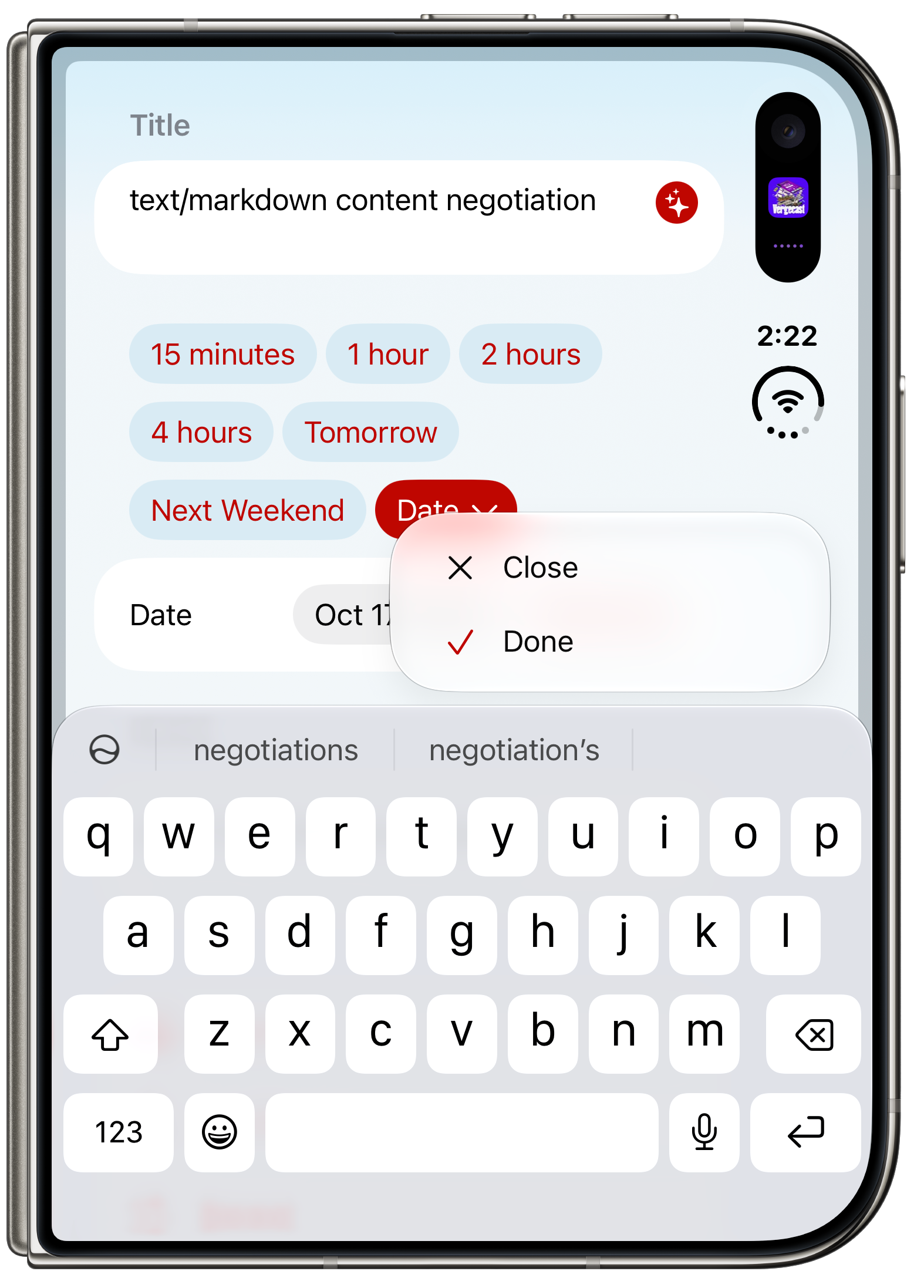
So the outer Duo display is so cramped when the keyboard is on screen that with a Live Activity showing, there is no longer room for a single pair of toolbar buttons. That turns a lot of one-tap actions into two-tap actions. And initially at least, it’s confusing. The whole point of Unforgetful is that it is not a complicated app. It really took me a minute to figure out that the Done button had moved into the “···” overflow menu.
One more examination of screen real estate, this time, with Messages, with the on-screen keyboard open. How much of the current conversation can you see?
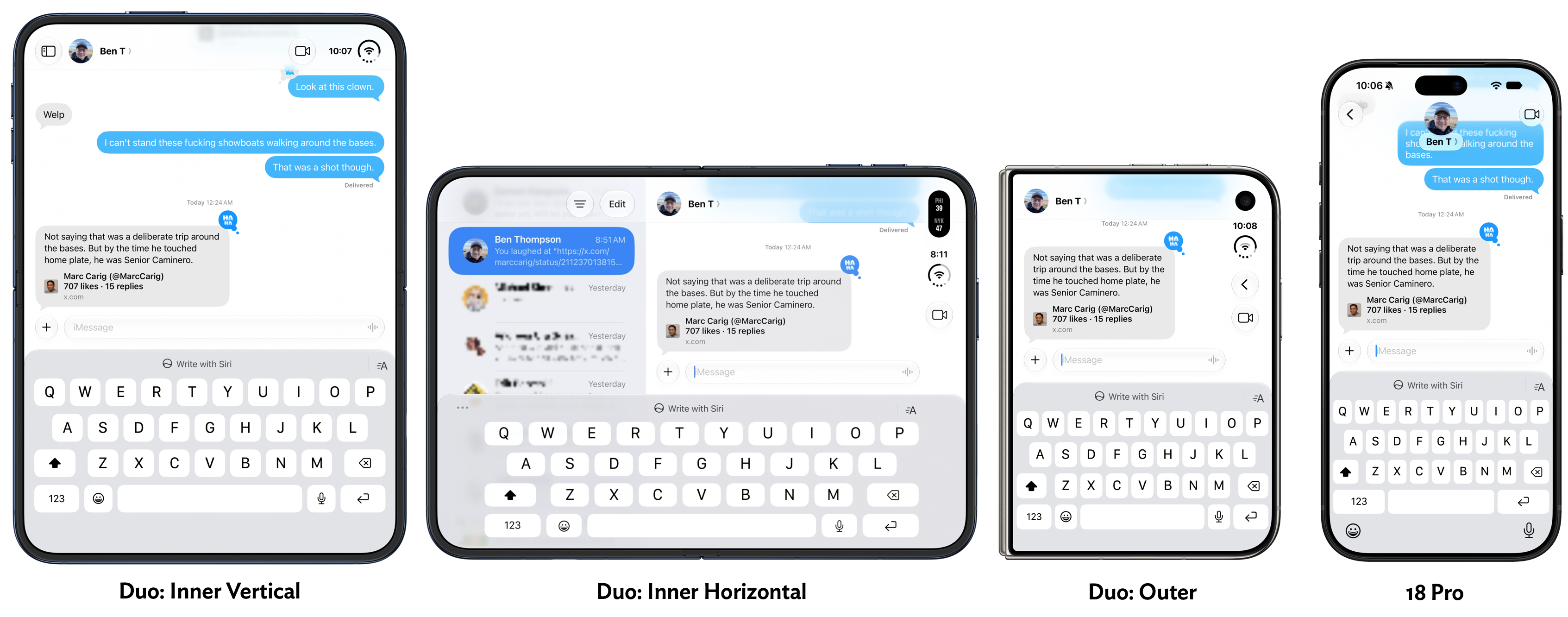
The Duo outer display has only a smidgeon of real estate available for showing previous messages. It’s a bit like using an ancient BlackBerry. The Duo inner display in horizontal mode doesn’t show much more, but all you need to do to see more is rotate the device (which makes it easier for thumb-typing anyway).
Using the Duo Open, With the Inner Display
Once the Duo is unfolded and unlocked (more on that below), it’s a terrific experience. I absolutely love the nano-texture finish. I love how it looks, and I love how it feels.
At the outset of this review, I opened with a list of obvious problems for any foldable device. I omitted the one vexing problem that Apple has solved: annoyance at a visible crease. They solved it by applying this nano-texture finish (which apparently is an easily replaceable surface layer). But it’s not like this is a trade-off that makes the display look bad or feel weird. I’d love a display that looks and feels like this on my non-foldable iPhone 18 Pro. No glare, even in sunlight. It’s amazing. There’s no accounting for taste — some people love glossy reflective displays that draw glare from any and all light sources. Not me.
No foldable phone on the market had a matte inner display until the Duo. I suspect most of them will next year, and by 2028 all of them will.
I mentioned above how close the open Duo is to the size and weight of an iPad Mini (a little smaller in size, but 15 percent lighter in weight). It just feels like a great little tablet, and this general size class has always been great for reading. Most Kindles and other e-ink readers are about this same size. I love reading on the Duo inner screen, vertically.
The Duo is great horizontally too. One obvious use case is video. Watching video, it’s easy to forget it’s an iPhone, not an iPad. Here’s as good a place as any to mention that the Duo’s speakers are great. Loud and separated. It produces surprisingly good sound for such a thin device.
Held horizontally, the iPhone Duo supports side-by-side multitasking with two apps. The user interface for this feature is brilliant. It puts every idea Apple has tried on iPadOS for multitasking to shame.
From 2010 to 2015, the iPad behaved like a big iPhone, showing only one app at a time on screen. This was limiting, yes, but delightfully simple and obvious. In 2015 with iOS 9 (this was before Apple renamed the iPad’s variant of iOS to “iPadOS”), Apple introduced both Slide Over and Split View. Both of them stunk. They stunk so bad that if you gave them a ride, you’d have to sell your car afterward. They were confusing and unintuitive. Slide Over in particular was often invoked accidentally and users couldn’t figure out how to get rid of it.
Even the newest iPads of the time (iPad Air 2, iPad Mini 4) still had Home buttons — the all-screen design without a Home button wouldn’t arrive until the iPhone X debuted in 2017, and it didn’t arrive for iPads until the late 2018 iPads Pro. The Home button was the key to all iOS interaction at the time. To launch an app, you tapped its icon on your home screen. To go back to your home screen, you clicked the Home button. You double-clicked the Home button to enter the app switcher. If you think about it, you can see how the Home-button-centric iPad hardware was incompatible with the idea of split-screen multitasking. Once you have two apps on screen at the same time, how can you control them with just one clickable Home button? What if you had, say, Notes on the left and Safari on the right, and you wanted to close Notes and replace it with Mail, while keeping Safari open on the right? How could the system know which one you wanted to close when you clicked the one Home button? The answer is it couldn’t. So Apple devised all sorts of other convoluted ways to manage this. I don’t even remember how it worked except that it was confusing and frustrating. Re-reading this old iPad developer documentation makes it seem even more unintuitive than I remember.
I was about to quip that whoever at Apple designed and approved of these multitasking UIs set the entire iPad platform back by a decade. Then I realized that, actually, it was more than a decade. The iPhone Duo is debuting 11 years after iOS 9’s terrible iPad multitasking, and only now has Apple designed and implemented a split-screen multitasking interface that is actually good. Split screen on the Duo is intuitive, natural, useful, and mostly obvious. In addition to all those accolades regarding how you purposely invoke and use it, it also is an interface that you seem unlikely ever to get into accidentally. Comparing the multitasking UI on the Duo to the iPad is like comparing the Mac to Windows — one is insanely great, the other a dog wearing a necktie pretending to be a person. Apple should throw out iPadOS’s multitasking interface and switch to this one. Honestly I’d prefer if they just threw out iPadOS and went back to running iOS — this new version of iOS created for the Duo — on iPads. The Duo flavor of iOS is a better tablet OS than iPadOS, Apple’s dedicated tablet OS.
On the Duo, split screen is only available when the device is horizontal. It’s always split 50-50. Each side of the screen gets an app that is basically the size of an app open on the outer display. Elegant. To move an app into split view, you drag the home indicator up from the bottom of the screen — the same gesture that takes you back to the home screen. But instead of letting go, you keep dragging. You get this:
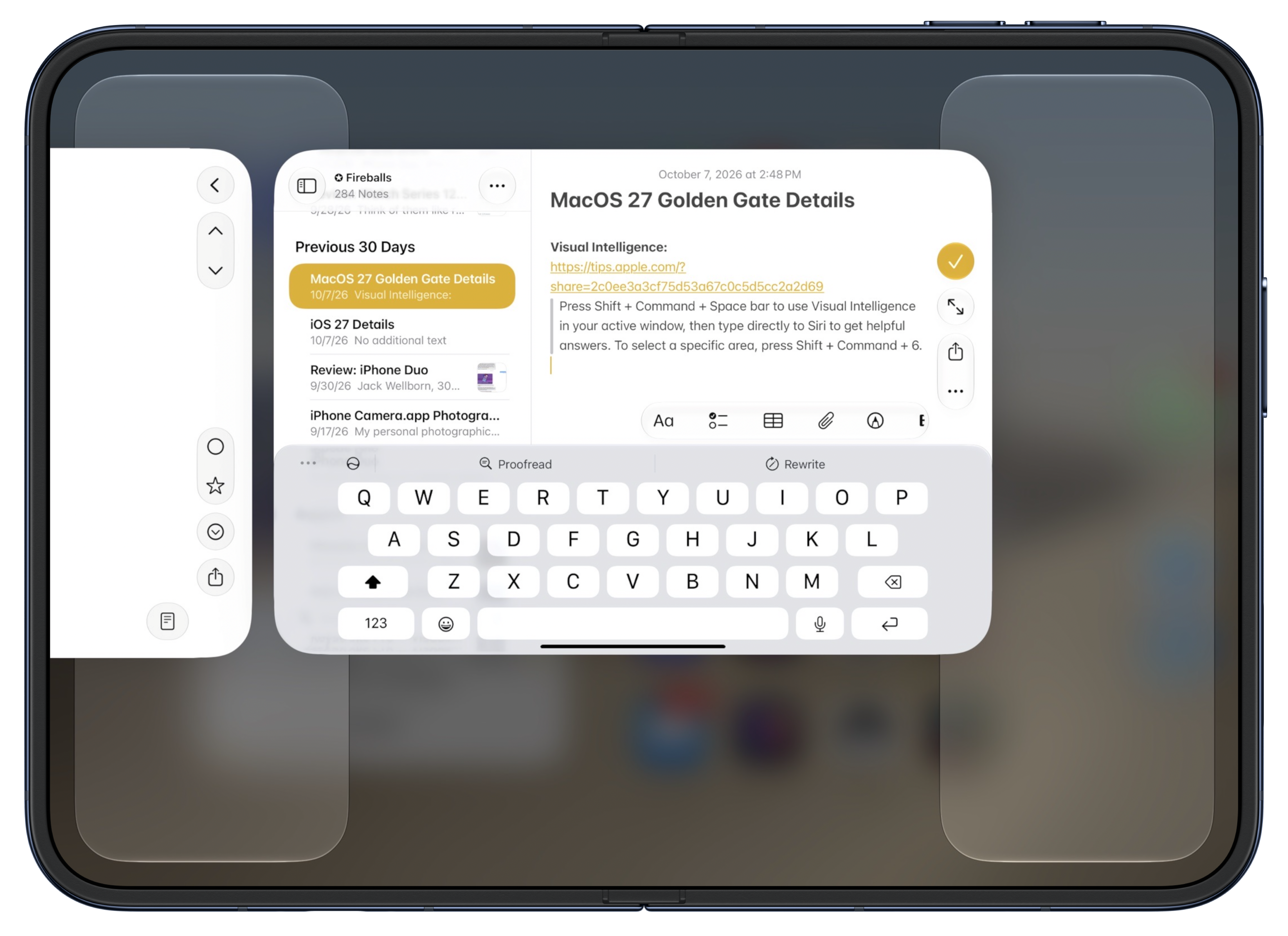
Those shelves on the left and right are drop targets. Drag and drop the current app to either side to put it there and enter split screen. The other side of the display just shows you a single-screen home screen:
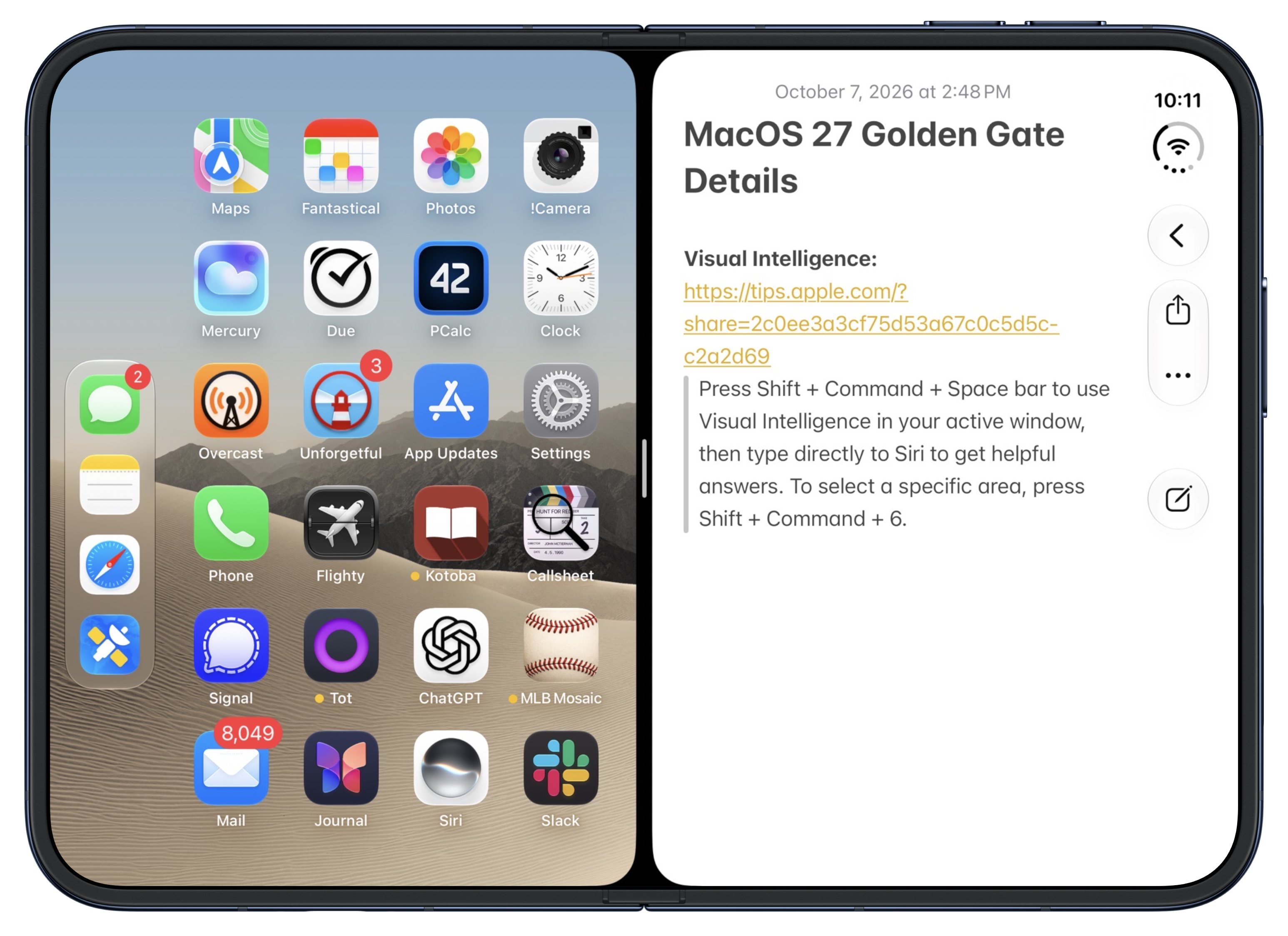
To open an app on that second screen, you just tap it. There is no step 2. Once you enter split screen mode, it’s like having two closed Duos side-by-side, except the left-side one is a reverse D shape. When the left side is open you can see that the Duo toolbar/Dock bias is not “put it on the right side”. It’s “put it on the outer side”. It just so happens that on the outer display, the right side is the outer side (with rounded corners, away from the spine). Open a second app, and that app’s toolbar will go on the left, if the app is on the left:
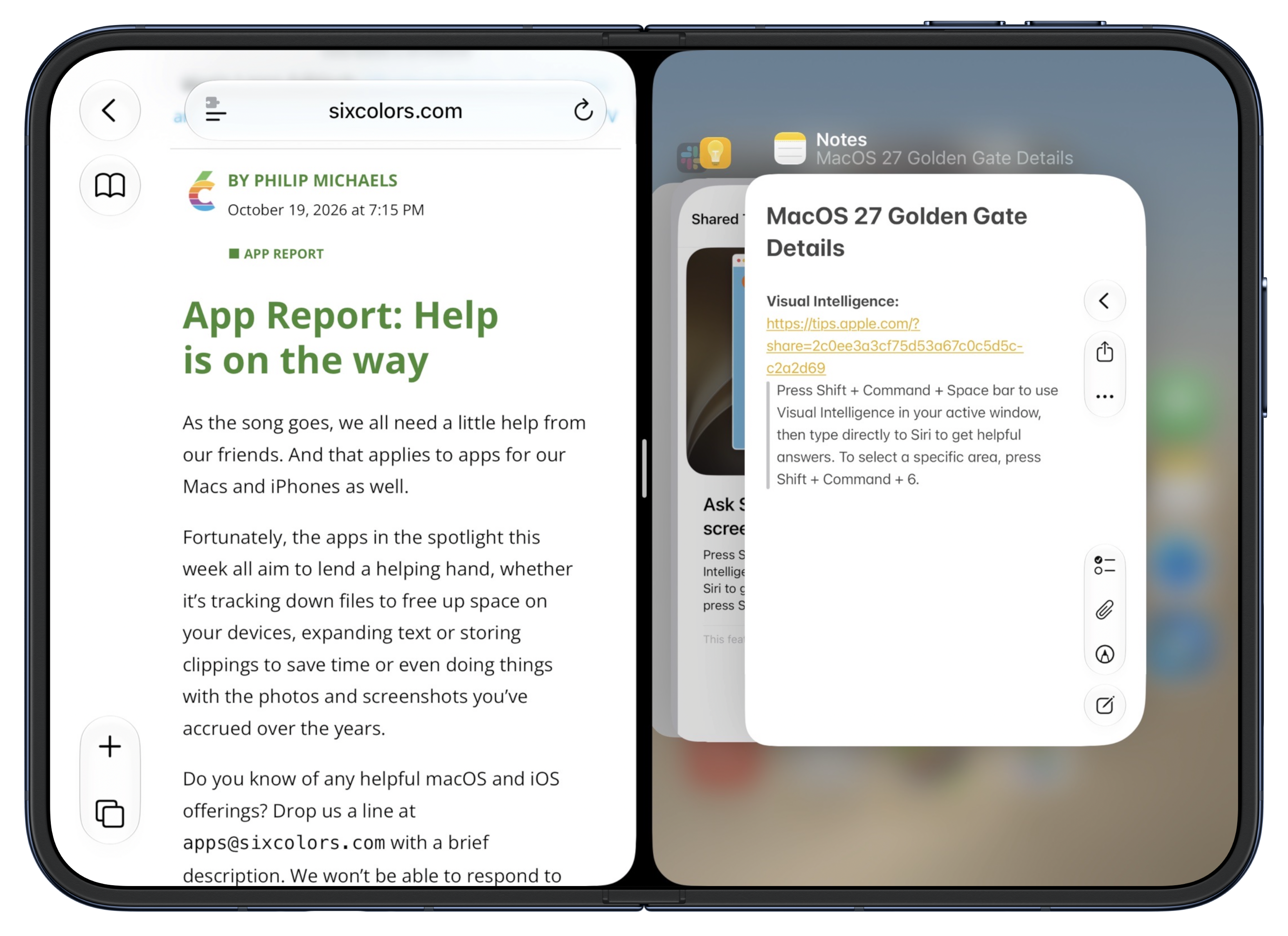
Each side of split screen acts like its own iPhone Duo. Drag up from the bottom of a side and you can go back to the home screen on that side. Or, as shown above, you can enter the multitasking switcher interface on that side — and it’s smart enough not to show you the app that is already open on the other side. Drag up from the bottom center and you return to the full-screen home screen or full-screen app switcher. Whatever you think ought to work, probably works. That’s intuitive design.
There is more to explore and think about here. These are not “windows”. But you can open the same app on both sides, like to show two Safari pages side-by-side. What this split screen UI gets fundamentally right is that it works exactly like using the iPhone for one-app-at-a-time launching and switching. The iPad’s original split-screen sin was trying to implement multiple apps on screen at the same time when the iPad still used a hardware Home button. With the modern iOS UI, where the physical Home button has been replaced by virtual on-screen home indicator bars, you can go from one home indicator (when there’s only one full-screen app) to three: one for the app on the left, one for the app on the right, and a third in the center to control them both as a pair. It’s so brilliant that most users won’t notice that there’s anything clever about the design at all. They’ll just use it. That’s the highest praise for an interaction design like this. It seems so obvious that it doesn’t seem designed at all.
Ironically, because iPhone Duo is not called an “iPad”, it gets to be what the iPad should’ve been all along.
The biggest problem I have with using the Duo on the inner display is an incorrect intuition that, after a full week of use, I am only now starting to break. What do you do when you’re done with a book for now? You close it. So what do I do when I’m done using the iPhone Duo, unfolded, before putting it in my pocket? I close it. But that doesn’t lock the Duo. It just switches to the outer display. I feel like I’ve done this a hundred times in the last week. I close it, thinking that I’ve locked it, and I put it away. But it’s still open. It eventually locks — perhaps sometimes quicker than you think. (iPhones have long used a bit of machine learning to try to detect when they’ve been pocketed or pursed while unlocked, and lock themselves before the normal auto-lock timeout.) Nothing bad has happened from doing this. But I’ve opened it up to some odd things on screen. This is not a complaint about Apple’s design, because when you want to switch from using the inner display to the outer display, you should be able to just close it. The iPhone Duo can’t read your mind. But I wish it could read my mind.
Touch ID and Authentication
The lack of Face ID on the iPhone Duo is an endless unceasing frustration. I’ll just farm this section out to what I wrote back on September 15, days after the Duo was announced, in my thoughts and observations column on Apple’s event announcements:
The lack of Face ID is a serious sad-trombone bummer, and in my opinion could sink the first-generation model. Side-button Touch ID is OK, but OK is not good, and even good is not insanely great. Face ID is insanely great. For whatever reason, the only iPads with Face ID are the iPad Pro models. Every time I review an iPad Air or iPad Mini, my biggest gripe is the lack of Face ID. I complained about it reviewing the iPad Air in 2022 and the iPad Mini in 2021, and in the five years since then my annoyance has only grown. With Face ID, so long as you’re looking at the screen as you unlock the device, it’s like not having it locked at all. It just unlocks, seemingly automatically. With Touch ID you must think about putting one of your registered fingers on the button every single time you unlock it. It never ever feels automatic. I feel quite certain Apple tried to fit a Face ID sensor on the outer Duo display and could not make the engineering work.
I’m much more concerned about convenience than security, but Face ID is 20× more secure than Touch ID. That’s according to Apple’s own Apple Platform Security whitepaper, updated just last month, which states:
The probability that a random person in the population could unlock a user’s iPad, iPhone, or Apple Vision Pro is less than 1 in 1 million with Optic ID or Face ID — including when Face ID with a mask is turned on. For a user’s iPad, iPhone, Mac models with Touch ID, and those paired with a Magic Keyboard with Touch ID, it’s less than 1 in 50,000. This probability increases with multiple enrolled fingerprints (up to 1 in 10,000 with five fingerprints) or appearances for Face ID (up to 1 in 500,000 with two appearances).
As a sign of how inconvenient the lack of Face ID is, Apple is promoting the fact that the iPhone Duo can be unlocked by your Apple Watch, like a Mac. No other iPhone needs such a crutch. Based on my experience with Touch ID iPads, wearing an Apple Watch all the time to unlock the Duo will feel essential. I don’t wear an Apple Watch all the time, and don’t want to start wearing an Apple Watch all the time, so I suspect this alone will keep me from switching to an iPhone Duo personally. On the other hand, for people who do wear an Apple Watch all the time and are happy to do so, the Duo’s lack of Face ID might prove to be only an occasional inconvenience rather than a constant annoyance.
I’ve seldom been more prescient. More than anything else about the Duo experience, I despise the lack of Face ID. It is a dealbreaker for me. I’ll reconsider a future model that at least has Face ID on the front outer display, but I have no plans to purchase this one. I tried to keep track in my pocket Field Notes notebook of how many times I had to be told to authenticate with Touch ID, along with a separate tally of how many times I had to enter my full device passcode in situations where I know I would not have with an iPhone uno, and I ran out of space on the sheet of paper. If you are not wearing an Apple Watch, it is an unceasing frustration.
Apple actually made a TV commercial exemplifying the Touch ID experience on iPhone Duo 20 years ago, as part of the “Get a Mac” campaign with John Hodgman and Justin Long. Here, you can watch it on YouTube. Over and over and over, seemingly 20,000 times a day: put your goddamn finger on the Touch ID button.
Now, if you do wear an Apple Watch, and you pair it with your iPhone Duo, and you enable the off-by-default setting to allow your watch to unlock your Duo, this is much better. It’s not good, but it’s at least tolerable. If you have multiple iPhones though, this feature only works if your watch is paired with your Duo. This is a fundamental shortcoming in the architecture of WatchOS. Apple Watch should be like AirPods, where it just pairs on-the-fly with whatever device you’re currently using, so long as they’re signed into the same Apple Account. You don’t have to pair your AirPods to one single device and then completely factory reset them to use with another. AirPods wouldn’t be a hit product if that were true. But that’s how Apple Watch works. It’s true that most people only own one iPhone, but the existence of the iPhone Handoff feature is proof that Apple is thinking about the fact that some of us own more than one. If one of them is a Duo, you will want to pair your Apple Watch with the Duo. But that means that with iPhone Handoff, your Apple Watch won’t share a cellular connection when you’re using your other iPhone. Cellular carriers are now more adept at seamlessly dealing with multiple iPhones than Apple’s own watch. It’s a complete mess of Apple’s own making.
The unlock-with-Apple-Watch feature doesn’t work all the time for me. When it does work, you know it, because you get a tap on your wrist from the watch every time your Duo unlocks via the nearby watch. But sometimes, even though I haven’t taken my watch off since it last unlocked the Duo, it doesn’t work, and I have to use Touch ID. Oftentimes, for reasons I do not understand, Touch ID isn’t enough, and I have to enter my passcode. I think it’s because I so often inadvertently press the side and Camera Control buttons while folding and unfolding the Duo — that might put it in a state where it wants to authenticate the most secure way possible, with my passcode.
It’s mildly annoying that your Apple Watch taps your wrist every time it automatically unlocks your Duo (dozens and dozens of taps per day, every day), but it’s obviously a good thing that it does. It obviously is less secure than Face ID or even Touch ID. I handed the Duo to my son to play with the hinge over the weekend, and as soon as he started playing with it, my wrist tapped. Oops, the whole iPhone was unlocked for him. That was no big deal, and in fact we shared a laugh about it. But it couldn’t happen with Face ID or Touch ID. (It’s worth noting that the wrist tap on your watch for this gives you a button to tap to lock your iPhone immediately — it’s not just a notification that it happened, it presents you with an action to undo it.)
There’s also an optional feature where you can unlock the Duo just by “resting” a registered finger on the Touch ID button. This does add a touch of convenience (again, I swear no pun intended), when I remember to do it, but this too doesn’t seem to work all the time. My theory is that sometimes I’m resting my finger on the button and the sensor doesn’t think the finger is a match. Other times, I wind up unlocking the Duo inadvertently, just by holding it with my thumb on the button. I never ever unlock my iPhones Pro accidentally. With the Duo, it happens at least once a day.
The only tolerable way to use the Duo is by always wearing an Apple Watch, and enabling the feature to allow the watch to unlock it. I do not want to wear an Apple Watch all day every day. And it seems ridiculous that that’s the only way to make the Duo experience tolerable. As annoying as it is to use an iPad with a Touch ID button, it’s far more annoying to use an iPhone with one, because I unlock my iPhone at least an order of magnitude more frequently than I do my iPad.
I’ll reconsider a future Duo model that at least has Face ID on the outside, but I don’t think I’ll ever truly enjoy the experience of using one unless it has Face ID on both sides. I can’t wait to finish writing this review, switch my eSIM back to my iPhone 18 Pro, and set this Duo aside on my desk. I don’t think Apple should have released the Duo before they figured this out.
Buttons and Camera Orientation, the Hinge, and the Cameras Generally
My Touch ID complaints are exacerbated by the fact that, from an experiential standpoint, the side button keeps moving around. When the Duo is closed, button placement isn’t a problem. But when it’s open, the buttons feel wrongly placed. On a Touch ID iPad, held vertically, the button is on the top on the right side. And from there, to switch to horizontal orientation, you rotate it counterclockwise, which moves the Touch ID button to the left side, at the top. But this is all backwards on the Duo. Held open vertically, the Duo’s Touch ID button is on the top on the left side. And you have to rotate it clockwise to get it back to horizontal. I’ve gotten more used to it after a week, but while using the big inner display, whenever I’m pestered to authenticate with Touch ID — which, again, is all the time — there’s also a moment of “Wait, where is the Touch ID button?” Many times throughout the week, while holding it vertically, the Touch ID button has been on the bottom, because my instincts for how to rotate it from horizontal to vertical and vice-versa are backwards from how the Duo intends. It’s like the Duo has a built-in game called “Where Are the Buttons?”, and it’s not a fun game.
The main camera orientation is more frustrating, and I consider it a mistake. The main camera is aligned with the small outer display. When you’re capturing photos or videos using the outer display, you hold the Duo horizontally to capture horizontal images, and hold it vertically to capture vertical images. But when you open the Duo, the camera sensor doesn’t magically rotate. So when you’re using the big inner display, you capture horizontal images when holding the Duo vertically, and vertical images when holding the device horizontally.
You can’t have it both ways. Apple needed to choose which display to align the camera with. Apple reps told me they chose to align it with the outer display because they think that’s the display users will use most often when using the camera. They’re probably right that the outer display will be used most frequently with the camera, so maybe they made the correct decision here. But my gut feeling is they should have aligned the camera the other way. Let the outer display have the reverse camera orientation. That would feel like an old Flip camera from 20 years ago — a small handheld camera that you held vertically to capture horizontally. Who cares if the viewfinder doesn’t fill the screen, the screen is tiny anyway.
It just seems weird to me that you can open the Duo to have a truly huge viewfinder, and there’s no way to fill it. Here’s Apple’s own Camera app, when the Duo is open vertically, open horizontally, and closed:
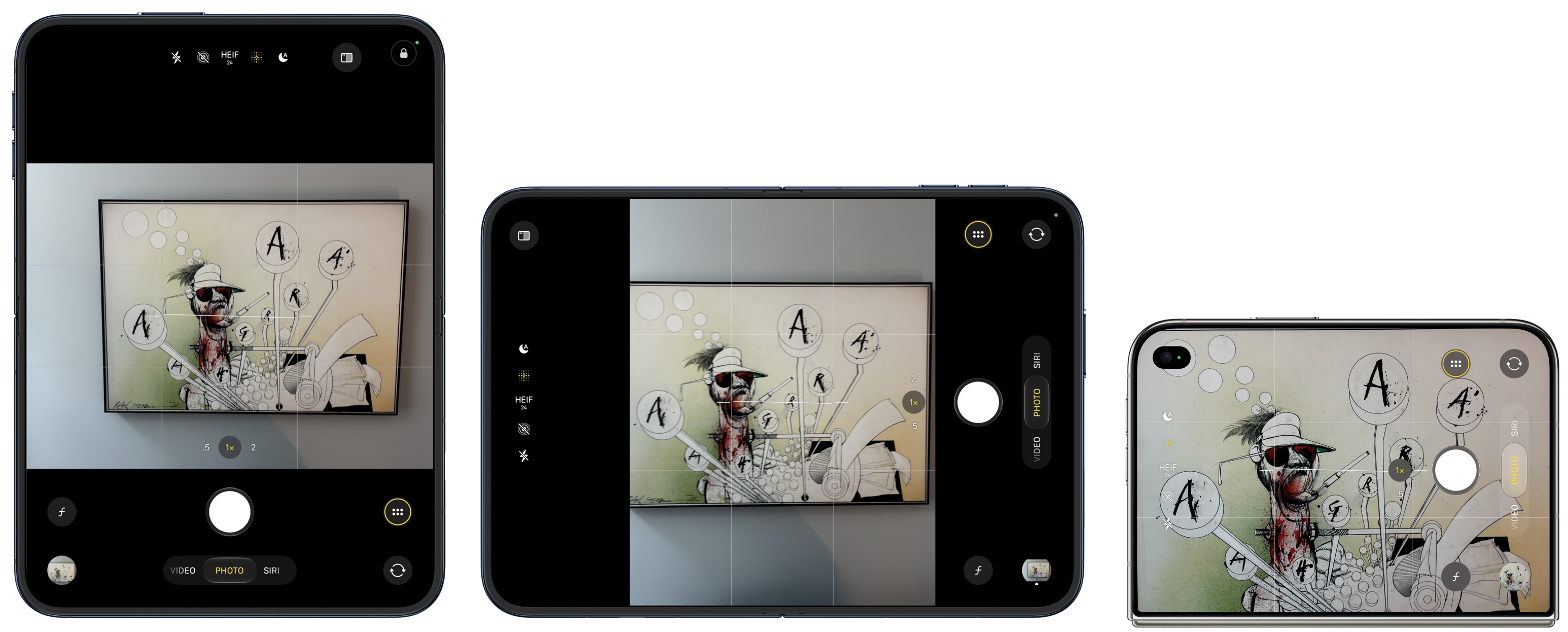
So with the big inner screen, you can never come close to filling the screen with the image you’re trying to capture. You get thick black letterboxing or pillarboxing. The viewfinder preview is roughly the same size on the inner screen as the outer screen, despite the inner screen being twice the size. This doesn’t make sense to me. I would prefer a tiny preview on the small outer display and a huge preview on the large inner display, with the camera sensors aligned with the inner display.
Also, because the outer screen is a different aspect ratio than the camera sensor (1.44 : 1 display; 1.33 : 1 sensor), photos taken using the outer screen capture a slightly larger image than what is shown in the viewfinder. That’s because the outer screen viewfinder presents a full-screen preview, which forces all of the Camera app controls to overlay the preview image. In the screenshot above showing the Camera app on the outer display, the actual photograph from that perspective includes part of the painting frame, even though you cannot see any of the frame in the preview. Here’s the photo I snapped with that preview. This discrepancy between the viewfinder and the actual captured image is not a huge deal — it’s OK to capture more than the viewfinder shows — but it’s worth being aware of.
As for the camera itself, it’s terrific. It’s clearly not of the same caliber as the iPhone 18 Pro, but it’s good. The technical specs of the Duo’s main 1×/2× camera are nearly identical to those of the year-ago iPhone Air, and I love the iPhone Air’s camera. If anything, the Duo’s camera should be better, because it gets the year-better A20 Pro imaging pipeline. Which, notably, brings support for the same new Photographic Styles, including textures like film grain, that were introduced with the iPhone 18 Pro. However, the Duo is not “Pro” — it does not get features like “Pro controls” (variable lens aperture, shutter speed, white balance, histogram), Apple Reference Image, spatial video, ProRES (video or RAW), or Apple Log. Apple’s “shot with iPhone” keynotes will continue to use iPhones Pro.
Also, notably different from the Air, the Duo has an ultrawide 0.5× second camera lens. This brings both the ultrawide perspective and macro photography. Like the Air, the Duo’s main 1× camera has a minimum focus distance of 15cm. That’s closer than the 17 and 18 Pro cameras (20cm), but there are a lot of times you want to snap photos of receipts or documents closer than 15cm. With the Air, you can’t focus closer than 15cm, because it only has that one camera. With the Duo, you can focus on subjects down to just 2cm away, using the 0.5× lens or the 1× lens in “macro” mode (which switches to the ultrawide lens but sensor-crops to the 1× field of view).
Build quality of the Duo seems nothing short of excellent. It’s solid. It has a satisfying feel opening and closing, and it closes with a particularly pleasing snap. When it’s open it stays open and perfectly flat. When it’s closed it stays closed, with no gap. However, if forced to choose between the verbs flip and pry to describe the force necessary to open it, the more accurate verb is pry. You need two hands for sure and you kind of need to get your fingernail in the gap. It’s also tricky to open or close without inadvertently pressing the side or Camera Control buttons. I wind up clicking both of these buttons all the time, and sometimes it messes things up. I’ve snapped four accidental photos with the Camera Control button while trying to close (or open? not sure) the Duo in one week. I have zero such photos from the last 30 days taken with my iPhone 18 Pro. At least one of these even looks obscene at thumbnail scale, which gave me a momentary jolt when I saw it in my camera roll:
There’s a subtle plastic lip around the inner display. This keeps the corners of the display from smacking into each other when you close it, and in practice while the Duo is open, this lip actually feels good to the touch, not like an unwanted barrier.
The same cannot be said for Apple’s $80 first-party silicone case. I can’t believe anyone will want to use this. It adds such a big lip to the outer display that you need to go into Settings → Display & Brightness and turn on a special option: “Shift Left Edge”, which shrinks the front display away from the left edge. It even requires glue to keep it attached. The adhesive is not particularly sticky — you can pop it right off — but I mean, come on. This contraption is ridiculous. I’ve never been a regular case user with my iPhones and I think people worry needlessly about scratches, especially now with Apple’s Ceramic Shield 2. I firmly believe that putting a case on your phone makes you more likely to drop it because you’re less likely to be careful with it. But foldable phones in particular seem inherently incompatible with cases that are subtle rather than obtrusively prophylactic.
Apple’s $130 folio case is better. It’s made with Apple’s “TechWoven” fabric, which has a good high-quality feel. It’s got a kickstand that I guess might be convenient at times, but I don’t understand the lifestyle where you want to open a cover just to see the front face of your phone every time you use it. Also, it’s $130.
Live a little, I say. If you buy a Duo, try it without a case. Get AppleCare if you’re the nervous sort.
The App Situation
Using apps that haven’t been updated for the iOS 27.0 SDK is a terrible experience. They just look like little virtual iPhone Minis floating in a sea of black on the big inner display. You can zoom them, like the old “2×” button on iPads when running iPhone apps, but that stinks too. Apps that have been compiled for the 27 SDK but haven’t yet updated to the new Duo-specific APIs in the 27.1 SDK are ... OK. But even some of them blow. Take a look at the NYT Games app, and its custom crossword keyboard — it needs an orthodontist. Most of my favorite apps have already been properly updated for the Duo. Some, however, like Tapbots’s Ivory, have not. Your bank probably won’t support the Duo until the Duo 2 is out next year. I think Apple has clearly done a great job evangelizing developers to support the Duo properly. Netflix does and it’s really cool. WhatsApp is in that middle state, where because it’s been compiled with the 27 SDK, it at least fills the inner screen, but it’s just a scaled regular iPhone layout. Signal, which has always been a particularly crummy app, is one of the turds that looks like an iPhone Mini floating in a sea of black.
[Update, Thursday: One day later and there’s an updated version of the NYT Games app, and they’ve fixed the orthodontic mess of their crossword keyboard, in both orientations. Screenshot. This goes to show just how fast the Duo-optimized updates are streaming in from developers. My review was up-to-date when I published at 7:00pm ET Wednesday, and outdated by the time I woke up Thursday morning.]
Last night I wanted to watch the Sixers beat the Knicks in their NBA season opener while I worked on this review. I had to use the NBC Sports app, which has not been updated for the Duo at all. The experience sucked. I could pop video out of the mini window to play sort of full-screen, but whenever I tapped the display it went back to iPhone Mini mode. The only good experience you can have using the iPhone Duo is with apps that have been updated for it. It’s better than nothing that un-updated apps run at all, but they certainly don’t deliver a premium $2,000-phone experience.
Using the iPhone Duo for this last week, in particular, has been fascinating in this regard. When I first got the Duo set up last Tuesday, very few of my third-party apps properly supported it. The ones that did were mostly ones where I was already a beta tester through TestFlight. As the week wore on, more and more apps with proper or at least semi-proper Duo support began appearing in the App Store. This made a huge difference to my pleasure using the device. By the time the very first Duo shipments reach actual customers this Friday, there will be more updated apps than there are today. It makes such a huge difference. I honestly don’t know how folks at Apple who’ve been privately testing the Duo for months before this managed to keep their sanity, unless they just eschewed third-party apps while testing it over the summer.
Miscellaneous
When you pair an external Bluetooth keyboard with the Duo, Command-Tab doesn’t do anything. I actually like pairing a hardware keyboard with my iPhone unos, for writing notes and Journal entries while I drink coffee in the morning. For years I’ve wished that iOS supported Command-Tab like iPadOS does. With the Duo, this seems like a glaring omission.3 The Duo plus a portable Bluetooth keyboard seems like an amazing travel or commute combination.
Standby mode (folded like a tent) is cool. In addition to Apple’s built-in clock/calendar/photo screens that you can swipe between in this mode, if you have a Live Activity going, you can tap the Live Activity’s small icon at the top in Standby mode and make the Live Activity take the full screen. “Laptop mode” is cool too, for apps like Netflix, so you can watch video on half of the inner display while the device is folded like an L.
There are so many nice little touches in iOS to support the Duo. Even the factory-fresh onboarding experience lets you fold and unfold it while you’re turning it on and setting it up. One of my favorite details is that when you rotate the Duo while on the home screen, the Dock doesn’t just move from the bottom (vertically) to the right (horizontally). Instead, it disappears and reappears, sliding in from off-screen in its new position. It reminds me of Pac-Man’s warp tunnel.
Battery life has been very good for me. No problem getting through a heavy day of usage at all.
The Duo often gets warm. Not hot, but noticeably warm. My instincts say “warm phone = bad for battery life”, but, per the previous item in this list, battery life is fine. There might be some use cases I haven’t spent much time trying, like graphics-intensive games, where thermals are a problem. But I didn’t run into them.
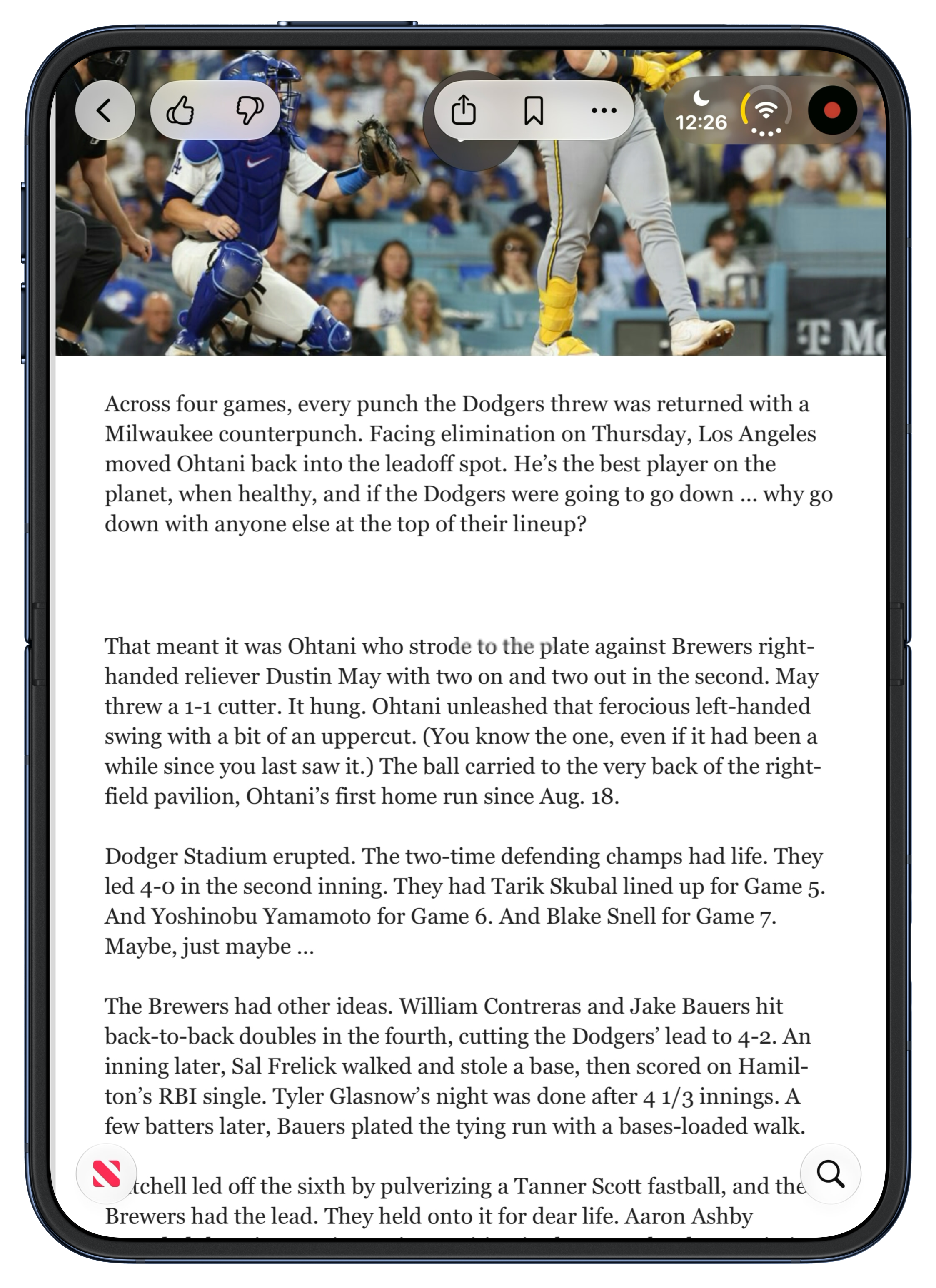
iOS 27.1 is a little buggy. Sometimes when I’m rotating the device using the inner display, apps get zoomed in too big, as though they think they’re on the small outer display or something. Tapping around or folding/unfolding again clears it up. I ran into one really weird rendering glitch, on Thursday night last week. I noticed what I first thought was a smear of schmutz on the crease. I tried to rub it away but it didn’t help. I thought for a few minutes that the display was breaking, coming detached right at the crease. But I only saw the smear when holding the Duo vertically. Horizontally it vanished. Here’s a screenshot showing it — look at the words “strode to the plate” in the first line of the second paragraph. If you zoom in, you can see that it’s actually a capsule-shaped overlay atop the text. Here’s a video screen recording of it while I scroll the article. This glitch was visible in the exact same position on screen — right on the 50-yard-line of the crease — in every single app I used while holding the Duo vertically. I took some screenshots and went to bed, without restarting the Duo. When I woke up Friday morning, the glitch was gone. I haven’t seen it, or anything like it, again. My theory is that I triggered it playing around that night with different “poses” for the Duo, including a bunch where I had it in an L- or V-shape, which in many apps puts a purposeful blur across the crease.

The Duo comes in two colors: star light (off white) and night sky (very dark blue). My review unit is star light. It looks good. I’d buy night sky if I were going to buy one, which I’m not.
Pricing:
| 256 GB | 512 GB | 1 TB | 2 TB | |
|---|---|---|---|---|
| 18 Pro | $1,200 | $1,400 | $1,800 | $2,400 |
| 18 Pro Max | $1,300 | $1,500 | $1,900 | $2,500 |
| Duo | $2,000 | $2,200 | $2,600 | $3,200 |
At every storage tier, it’s $800 more than an 18 Pro and $700 more than an 18 Pro Max.
The Decision
Every time you pick up the Duo to use it you face The Decision. Open it? Or be lazy and suffer with the outside display? Every time. Even if you get used to all the other things, you’ll always face The Decision, every time you pick up the Duo.
And there’s a third option. Just after writing the preceding paragraph, I took a break to pick up some sandwiches for lunch. Get out of the house, enjoy at least a few minutes of a beautiful autumn afternoon, and stretch my legs. Waiting for the sandwiches to be prepared at the bagel joint, I took the Duo out of my pocket and checked NetNewsWire. First article up was a good one. Started reading. Screen’s too small. Do I want to open the Duo? Sandwiches aren’t going to take long. I clicked the side button to sleep the Duo and put it back into my jeans pocket (where it sank like the brick that it is). I spent the rest of the wait alone with my thoughts, pondering how to finish this review.
Apple isn’t going to start an ad campaign with a slogan like “So cumbersome you’ll keep it in your pocket”, but that’s part of my experience. If you really want to do something, or sit back and read or watch something, the big display is fantastic. But that Duo-as-tablet experience is so cumbersome compared to the “just look at it” experience of using a regular iPhone uno that you simply cannot do it every time you use the Duo. You will use the outer display quite a bit. And using the outer display delivers the worst iPhone experience ever. I mean, some iPhone has to be the one that offered the worst iPhone experience ever. That iPhone is the outer half of the iPhone Duo. Perhaps for some people looking to be more mindful of their screen time, this is actually a selling point.
Here’s my steelman argument for the Duo. iPads are good devices. Almost everyone likes them, and many people love them. But wouldn’t it be better if you could fold an iPad in half to make it more portable? The answer has to be yes — if that foldability did not saddle the device with an ugly visible crease in the display. Folding in half would be a nice trick for any iPad, but especially the iPad Mini. An iPad Air folded in half would fit in more compartments in your backpack, but it would not fit in your pants. An iPad Mini folded in half would. Wouldn’t it be even better if Apple added a small screen to the outside of this hypothetical foldable iPad Mini we’re imagining? That way, even when folded, you could check the time, see recent notifications, and pay attention to Live Activities. That sounds like a great idea, right? Well, that’s the iPhone Duo.
If you’d rather trade your iPhone for an iPad Mini that you can fold in half to carry around, the iPhone Duo might be the form factor for you. Even if that’s the case, though, this first iPhone Duo might not suit you, for all the various irritations and shortcomings I’ve documented above. Plus, an actual iPad Mini costs $800 for 256 GB of storage (at this writing); an iPhone Duo with 256 GB costs a cool $2000.
It’s been a lot of fun trying the Duo out for a week, but it feels like I’ve gotten to use an extraordinarily polished prototype — not a finished product that I’d want to buy and carry. ★
-
I thought about referring to the Duo variant of iOS 27 as “DuOS”, which seemed clever in my mind, but looked stupid as hell the first time I tried typing it. “DuoOS” isn’t much better. So I’ll go with “iOS Duo” as shorthand for now. ↩︎
-
I’ve kept a consistent Dock arrangement on my iPhone for as long as I can remember. From left to right: Messages, my notes app, Safari, and my “what’s new?” app. My notes app originally was Apple Notes, then Simplenote, then Vesper (duh), and ever since Vesper’s demise, Apple Notes again. My “what’s new?” app (which, if I’m being honest, might better be described as my “I’m bored” app) was Twitterrific, then Tweetie, then Twitter, then Tweetbot, then Ivory. Several months ago I prioritized RSS over all social media platforms, and moved NetNewsWire down there. I don’t check any Twitter-like social networks until I feel caught up on RSS, which means I often don’t check them at all. I’m at least a little happier for it, and I know I’m more productive. ↩︎︎
-
Also, with an iPhone uno, when you pair a hardware keyboard, you can use Command-H to go to the home screen. That doesn’t work on the Duo. I don’t know if that’s a bug or a design concession for the fact that with split screen multitasking, “go to the home screen” can’t be a single command. You might want to go home on the left, on the right, or full screen. Swiping on screen makes those actions unambiguous. Command-H would not. If you think about it, this is actually very similar to the conundrum I mention elsewhere in this review, regarding the incoherency of Apple’s decade of attempts to bring split-screen multitasking to the iPad in the Home button era. I think with a paired keyboard, however, Command-H should just always take you back to the full-screen home screen. Make it go all the way home, not just halfway home. ↩︎︎
Monday, 19 October 2026
- Barack Obama on the Trump Administration’s Intimidation Campaign Against Congresswoman Ilhan Omar ★
-
Barack Obama, in a 430-word essay:
It is a basic principle of American democracy that the government can’t selectively target individuals simply because of their political beliefs or what they say. But that’s exactly what the Trump Administration is doing to Congresswoman Ilhan Omar of Minnesota. [...]
The fact that any president, or any administration, is willing to engage in such transparent efforts to intimidate someone should outrage all Americans, regardless of how they feel about Congresswoman Omar’s political views. Because if this becomes the new normal, there’s no reason to believe it will stop with her — or that future presidents, in either party, won’t do the same.
Thoughtful, sharp, and eloquent as ever.
But Obama posted this essay on X, which, I have been told in the past week, shows that he in fact is a Nazi sympathizer, a fascist, a pedophile, and unconcerned about racism. As surprised as I was to learn those things about myself, I’m equally surprised to learn them about President Obama, whom I heretofore considered a thoughtful statesman and moral compass.
Either that, or, Threads, Bluesky, and Mastodon have relegated themselves into irrelevance by allowing their discourse to be dominated by a fringe of unhinged kooks who want to be angry and want everyone else to be angry.
- From the DF Archive: Should a CEO Be a Nerd About Their Company’s Products? ★
-
Back in 2022, I quoted from an interesting post by Ben Schlappig at One Mile at a Time, where he wrote:
I’ve had the opportunity to interact with quite a few senior airline executives over the years, and I find that their knowledge about competitors is typically one extreme or the other:
- Some airline executives literally couldn’t tell you the first thing about their competitors, and have no knowledge of their passenger experience, fleet, etc.
- Some airline executives know literally everything about their competitors, down to being able to tell you how many seats competitors have on specific planes
I find there are very few executives who are just kind of in the middle, as it’s pretty polarizing. Either they know virtually everything about competitors, or nearly nothing. Without naming any names, I’ll say that generally speaking there’s a high correlation between airlines that have a great passenger experience, and airlines that have executives that keep very close tabs on the competition.
And I wrote:
If the CEO’s primary perspective on the company is via spreadsheets — if it’s all just P&L to them — that company is not going to excel at quality. Or if they do excel at quality, they won’t for long.
I think Tim Cook was truly an exception in this regard. He’s not a product guy, and never pretended to be. He is a spreadsheet guy. But he clearly realized that about himself, and he understood that Apple’s entire point is delivering great products and experiences. But I think Ternus is a breath of fresh air in this regard. Apple didn’t immediately switch to decision-making by quantifiable numbers under Cook, but incrementally, year-by-year, decision-making by quantifiable numbers took over.
You simply cannot assign numeric values to everything, and some of those things that cannot be quantified are the most important things. Apple needs a CEO who makes some major product decisions by gut alone.
- Apple Event, in Los Angeles, Next Week: ‘Pro and Tell’ ★
-
Greg Joswiak, on X:
Can’t wait to pro and tell next week.
Rumors suggest Apple is planning to debut the new MacBook Pro with an OLED touchscreen display, an M6 entry-level MacBook Pro, an M6 iMac, an iPad mini with an OLED display.
Estimated Arrival Dates for DF Readers’ Pre-Ordered iPhone Duos
Monday, 19 October 2026
Yesterday I posted the same question to my followers on X, Threads, and Mastodon:1
Poll, only for people who have pre-ordered a Duo. When is your delivery/pickup date?
- October
- November
- December
- January
The results were interesting; I’m glad I asked.
| X | Threads | Mastodon | Total | |
|---|---|---|---|---|
| October | 36% | 38% | 39% | 37% |
| November | 35% | 42% | 45% | 39% |
| December | 10% | 9% | 8% | 10% |
| January | 19% | 11% | 8% | 14% |
| Responses | 1,382 | 1,034 | 449 | 2,865 |
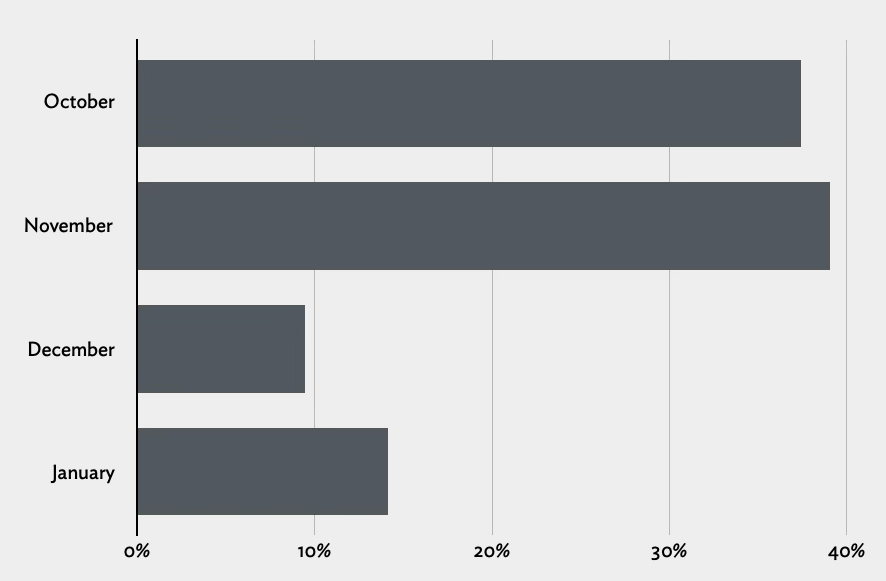
Observations:
There were way more people who successfully got October ship dates than I expected. It’s very close to even with November ship dates.
The fact that there are fewer December ship dates than January, is to me, a sign of Apple’s appreciation for the holidays. I think Apple is only promising “December” for shipments they are 100 percent certain they can deliver by Christmas. I bet a bunch of the orders promised for January will in fact ship in December — albeit perhaps too-late-for-Christmas December.
Apparently some configurations are getting an estimated date of February 1. I wish I’d listed February as an option, but I don’t think it would have made a big difference.
Per MacRumors today, some pre-order estimates are already moving up, like from early December to late November.
No one should mistake my audience as representative of the general public in any poll, but I bet my audience is at least ballpark representative of the general public when it comes to something like pre-ordering, at the crack of dawn, a new iPhone form factor that costs $2000 to $3200. ★
Monday, 19 October 2026
- Netflix Shitcanned Film Chief Dan Lin Too ★
-
Anthony D’Alessandro, reporting for Deadline:
Dan Lin is out as film boss at Netflix in a move that has been largely speculated for weeks. Insiders at the streamer have denied that Lin and even Bela Bajaria were on the chopping block, but here we are.
Lin is meeting with his feature staff Monday morning for a post-mortem after the news. Per sources close to the situation, a successor to Lin won’t be named until the arrival of Peter Rice, who is taking over Netflix’s Chief Content Officer role from Bajaria.
Netflix’s movies are worse than their series, which also mostly stink. (As opposed to Apple TV, which somehow makes terrible movies while making the best series in the business.)
it has long been understood that, qualitatively, a “netflix movie” exists in the liminal space between theatrical release and Lifetime production
with some notable exceptions, even the biggest budget productions feel cheap, strange and worst of all, unmemorable
- Ex-Apple Employee Fred Potter on HomeView ★
-
Fred Potter, on LinkedIn:
So if you ever meet someone who tells you, “At Apple, I’m the one who did this,” take it with a grain of salt. They were probably part of the team that made it happen, and that’s already something to be proud of.
Sometimes, when the final product finally comes out, you can recognize a few of the personal touches you contributed along the way. And that, in itself, is immensely rewarding.
Wishing HomeView every success!
Potter’s LinkedIn bio lists his time at Apple as July 2021 through June 2024, and describes it only as “Worked on HomeView”. (Via Christophe Laporte at iGeneration.)
- Netflix Lays Off 6 Percent of Staff ★
-
Joe Flint and Jessica Toonkel, reporting for The Wall Street Journal last week:
Netflix is cutting 6% of its staff, or roughly 1,000 positions globally, its biggest round of layoffs since 2022, as it struggles with slowing growth and customer engagement. Co-Chief Executives Greg Peters and Ted Sarandos said in an email to employees Wednesday morning that the bulk of the cuts would be in the streaming giant’s product, tech, legal and human-resources teams.
The layoffs may have hit those teams (including some of the talent that created the excellent Duo support for Netflix’s iOS app), but Peters and Sarandos seem to know where the fundamental problem lies: Netflix has peaked and their content blows.
Flint, in a follow-up report the next day, “Netflix Replaces Content Chief as It Struggles to Engage Viewers”:
Netflix’s Chief Content Officer Bela Bajaria is leaving the company, as it struggles with slowing growth and falling customer engagement.
Yours truly, back in August: “Netflix Has Peaked”.
- Time Magazine Profiles John Ternus ★
-
Andrew Chow, writing for Time:
Just below the broad smile he’s been wearing all morning, John Ternus’ hands are shaking.
On this September day in Silicon Valley, Apple’s new CEO is surrounded by celebrities, tech enthusiasts, and reporters who have flocked to Apple Park from around the world to catch a glimpse of the company’s new and long-awaited foldable phone, the Duo. After Ternus takes a few photos with the device, an Apple PR rep pulls the influencer known as IShowSpeed out of the crowd to meet him. Winning over the 21-year-old isn’t exactly the toughest assignment Ternus has faced in his 25-year Apple career: Speed barks when he sees the phone and then gleefully springs into a backflip.
But IShowSpeed also happens to be livestreaming the encounter to his 61 million subscribers on YouTube. And as Ternus thumbs through the $1,999-and-up phone, attempting to drag a photo into a text-message box, eagle-eyed viewers notice his hands quivering. Ternus later explains that he didn’t sleep much the night before. “I was on such a moment of adrenaline and caffeine and excitement for the day,” he tells Time.
There’s only a glimpse of Ternus’s personality revealed here. To date he’s more of a cipher than even Cook. He’s Apple’s San Francisco sans serif typeface brought to life. Handsome, distinctive, decidedly “Apple” — but plain. That, surely, is not the real John Ternus.
So it’s fitting that his ascension coincided with the announcement of the Duo, Apple’s most radical design change to the iPhone since its 2007 release. Apple has been exploring the concept for years. In 2011, when many people still carried around flip phones, Ternus and five other engineers filed a patent application for foldable electronic devices, exploring what kind of batteries and circuit boards might be needed for such an idea. “It felt clear that we were going to eventually get to a place where OLED displays were going to be flexible,” Ternus says.
The Ternus profile is the cover story for Time’s “Best Inventions of 2026”, which is led by the iPhone Duo. Let us not forget that this esteemed accolade was awarded to Humane’s AI Pin in 2023.
At the end of September, Apple was conspicuously absent when President Donald Trump hosted a luncheon for AI power players like SpaceX’s Elon Musk, Meta’s Mark Zuckerberg, and Google’s Sundar Pichai, who lobbied him on their visions for America’s tech future.
But Ternus and other Apple executives say they aren’t concerned. In the midst of a populist AI backlash, they contend that they are building a modest but personalized and privacy-preserving form of AI that will actually help ordinary people as opposed to merely dazzling Silicon Valley’s “lunatic fringe,” as Greg Joswiak, senior vice president of worldwide marketing, puts it. And besides, Ternus argues, even if other companies succeed in their mission of building super-intelligence, users will still want to talk to it on Apple devices.
This is, I’m convinced, the correct strategy for Apple. They’re smart not even to be ankle-deep in the wild capex spending pool that has all of their peer companies way out in the deep end, where their feet no longer touch the bottom. But this is a bet, and bets carry risk.
Also, I’d bet my bottom dollar that Joswiak is, in fact, a decades-long fan of Lunatic Fringe.
Sunday, 18 October 2026
- Tom the Dancing Bug’s Inner Hive, and Harvey Richards, the Greatest Lawyer in the History of Fiction ★
-
Ruben Bolling’s long-running Tom the Dancing Bug is one of my favorite comic strips. I’ve been a huge fan since the early 1990s, when I started reading it in alternative newspapers. (Newspapers were sort of like websites, excepted they were printed daily or weekly. I swear.) Back in 2012 Bolling — noting that the comic was more widely read than ever yet generating less money than ever — started a subscription membership called The Inner Hive. I love it. Not just because I’m supporting work that I adore and value, but because the extras that members get are so fun. If you’re even half as big a fan of Tom the Dancing Bug as I am, you should join too. There are several options — Patreon, MailChimp, Substack — but in my opinion Patreon is the simplest and the best, and it gets you everything.
I was reminded to re-endorse The Inner Hive after I wrote a post last night referencing Harvey Richards, lawyer for children — one of the comic’s longest running recurring characters. Tom the Dancing Bug’s entire schtick is premised on a wide array of recurring characters and premises, but Richards is probably my favorite. Here’s an early one regarding the doctrine of “He Who Smelt It, Dealt It” that ran in National Lampoon in 1990. Here’s one from 2012 at Boing Boing (where Bolling is a contributor), and here’s one from 2018 where Richards joins the Trump 1.0 White House, and specifically invokes the “I’m Rubber, You’re Glue, Everything You Say Bounces Off Me and Sticks to You” doctrine that I mentioned as a Richards specialty in my post yesterday.
But the thing is, my earliest memory of Harvey Richards was regarding the “I’m Rubber, You’re Glue” doctrine. It’s the foundation of all of children’s law, obviously. In my memory, it’s the first thing I remember about Harvey Richards in the strip. But I searched the web, and couldn’t find any old strips with it. I asked the LLM robots to search, and they came up with nothing. So I wrote to Bolling, with whom I’ve exchanged occasional correspondence for many years. Bolling not only confirmed that my memory isn’t entirely shot, but he graciously granted me permission to reproduce it here. It’s from 1993, when I know I was already a weekly reader of the strip.

- WorkOS AuthKit ★
-
My thanks to WorkOS for sponsoring DF last week. Login looks simple until you’re building password resets, email verification, MFA, social providers, session management, and the enterprise SSO your first big customer asked for last week.
WorkOS AuthKit lets you:
- Offer SSO, MFA, passkeys, passwords, email codes, and social sign-in.
- Add and remove users automatically with SCIM provisioning.
- Track who did what with audit logs.
- Verizon Is Going to Charge $10/Month for iPhone Handoff ★
-
Verizon, in a post headlined “Switch to Verizon and Get the New iPhone Duo Now. No Trade-In Needed.”:
Verizon will support iPhone Handoff, giving customers the flexibility to use a single Verizon phone number seamlessly across two compatible iPhone models. Whether using the pocketable iPhone Duo on the go or iPhone 18 Pro for work, customers can switch active status between devices at any time while keeping full access to Verizon’s 5G network. iPhone Handoff will be available from Verizon for $10/month on compatible iPhones models running iOS 27.
First, the word “now” is doing a lot of work in that headline, given the current January 25 estimate for new Duo orders.
Second, we all know Verizon is the most expensive competent carrier in the U.S. (Maybe AT&T is just as expensive, but I said “competent”.) It feels like a rip that T-Mobile is charging $5/month. Verizon charging double is on-brand but irritating.
- Gurman on HomeView: ‘Finished Units Have Been Sitting Boxed Up in Warehouses for the Better Part of a Year’ ★
-
Mark Gurman, today, in his weekly Power On column for Bloomberg (gift link):
Without a serviceable version of the new assistant, Apple couldn’t deliver the experience it had envisioned. That left the hardware ready to go, but the software nowhere near finished.
So Apple postponed the HomeView repeatedly — first until spring 2025, then summer, then fall, and then again throughout 2026 before finally unveiling it this past week. And the hardware betrays its age. With thick bezels, an A18 processor and 8 gigabytes of memory, this is clearly a product conceived years ago. Finished units have been sitting boxed up in warehouses for the better part of a year, waiting for the software to catch up.
The A18 chip and 8 GB of RAM aren’t a sure sign of delay; this year’s MacBook Neo has the 18 Pro chip and only 8 GB RAM, and wasn’t delayed. And if a kick-ass MacBook can get by with an A18-class chip and 8 GB RAM, surely a HomeView can too. HomeView only does a fraction of what a Mac can do, and the MacBook Neo is perhaps Apple’s best new product in years, full stop.
But I have no reason to doubt Gurman that this hardware was finished and production started long ago. His reporting on this product has proven out going back two years. Parts of Apple clearly — and disastrously — believed that a credible version of Siri AI would ship in early 2025. You might recall my writing about that. HomeView clearly depends on having a credible version of Siri AI behind it. But Siri AI didn’t ship until last month.
One revealing sign of how long this thing has been in development: I spotted several posts on social media from former Apple employees proudly touting their work on the HomeView. These weren’t people who had just left the company, either. Some hadn’t worked at Apple in quite a while, yet were still able to point to the newly announced device as something they helped create. That tells you plenty about how long ago much of the work was completed.
That’s juicy, but it might have been good to include some links here?
- Claim Chowder: The Information on HomeView Having a ‘Robotic Swiveling Base’ ★
-
Wayne Ma and Qianer Liu, reporting, wrongly, for The Information in January this year (paywalled; here’s MacRumors’s summary)
Apple’s pin joins a growing portfolio of AI-powered products the tech giant has under development, including AirPods equipped with enhanced sensors, a security camera, smart glasses and augmented reality glasses, according to multiple people familiar with the projects. Apple is also working on a home product featuring a small display, speakers and a robotic swiveling base, designed with a heavy emphasis on AI features. That device could be released as soon as this spring, according to two of the people.
Wrong. So I’d say that the stupid-sounding “AI pin” that these same “people familiar with the matter” told Ma and Liu about is probably equally wrong. (That supposed “AI pin” was the main thrust of the article.)
I love to point out when Mark Gurman is wrong, which is not infrequently, but in the case of HomeView he’s seemingly been right about everything going back to 2025. He reported back in April 2025, with codenames, that the initial HomeView (J490) had no robotics but that a subsequent version (J595) would — or at least might. Two dinguses heard a rumor about J595 and told The Information it might ship six months ago, when in fact it’s something that won’t ship until 2027 or 2028 at the earliest. But The Information ran with it.
The phrase “familiar with the matter” often just means “who heard something about it from someone who goes to the same gym as a guy whose wife works at Apple”. Substitute that longer phrase whenever you see “people familiar with the matter”.
- Apple Issues Statement on Duo Demand Far Outstripping Supply ★
-
The Financial Times:
Apple had originally promised delivery of the Duo by October 23, but within hours of orders opening, delivery times through Apple’s website had slipped into late January. US mobile carriers also saw delivery times for new orders pushed back.
“The pre-order demand for iPhone Duo, our first foldable iPhone, has been nothing short of extraordinary,” Apple said in a statement. “We are working hard to get this revolutionary new product into customers’ hands as quickly as possible,” it added.
Of course Apple is going to play it this way. I would too. But no one other than Apple’s operations teams knows how low the initial supply is. Just judging from my friends and my social media feeds, I think demand is quite strong for a device that starts at $2000. But I think initial supply is incredibly low.
To that point, Hartley Charlton has a nice scoop for MacRumors:
Apple Store employees told MacRumors that they have been advised that there will likely be no iPhone Duo stock available for walk-in purchases on launch day. Staff have been instructed to discourage customers without pre-orders from coming in expecting to buy the device, warning that they will be disappointed. [...]
Warnings about a constrained launch began well before Apple announced the iPhone Duo. In early September, Nikkei Asia reported that production had reached only a few hundred devices per day in late August. Further production problems emerged in late September.
I suspect this means Apple is going to discourage, if not disperse, anyone attempting to camp out overnight on Thursday outside Apple stores.
That said, a few hours after pre-orders opened Friday morning, ship dates went to January 25. They’re still at January 25, as I write this Sunday afternoon. So it seems Apple expects to greatly increase production in the next two months. I bet a lot of those “January 25” pre-orders wind up delivering weeks before that. Apple has a strong history of under-promising and over-delivering when new products are backordered.
- Manton Reece’s Spitball Theory on Why the Wall-Mounted HomeView Costs the Same as the Version With the Subwoofer Base ★
-
Manton Reece:
All I can come up with is that Apple doesn’t want you to buy the wall-mounted version unless you’re really sure that’s what you need. If the wall-mounted version was cheaper, some people might buy it based on price, then be unhappy because it’s too much trouble to install.
Oh, that clicks for me.
- Michigan Democratic Senate Candidate Abdul El-Sayed on His Allegiances ★
-
I do see some political content in my feed on X. For example, this extraordinary video posted by Abdul El-Sayed, who seems poised to become the next junior senator from Michigan. You should watch it. It’s so good you might suspect the questioner was a plant, but in fact, he was not. This actually happened. El-Sayed actually handled this heckler this well, on the fly. And he posted it on X, where it’s garnered 9 million views. He posted it on Bluesky too, if you’d prefer that. El-Sayed hands this guy his (red) hat so soundly it’s like something out of an Aaron Sorkin script: “So I think it’s you who needs to understand the Constitution, not me.”
Update: This guy “Tommy” was in fact a plant — a plant from the Republicans. The best way to understand the political re-sorting that Trumpism has created isn’t left/right or conservative/liberal. It’s smart/stupid. There are and always have been stupid people everywhere — on the left, on the right, at the top, at the bottom. But Donald Trump turned the Republican Party into one that celebrates stupidity and ignorance. That this dope Thomas Teepell was a Republican operative whose stunt blew up in his face, Wile E. Coyote style, exemplifies that.

Saturday, 17 October 2026
- Whatever You Say Bounces Off Me and Sticks to You ★
-
Stephen Nellis and Deepa Seetharaman, reporting Wednesday for Reuters:
An OpenAI employee who left the ChatGPT maker for Apple sent more than 100 files about an unreleased product to a personal account and later made a presentation about the unreleased product to senior Apple leadership, a new filing in the lawsuit between OpenAI and Apple alleges.
In the filing in US federal court in San Jose, California, OpenAI alleged that the presentation happened months ago and that Apple is now making AI products of its own, citing the release of Apple’s HomeView product this week.
“OpenAI is very concerned that its trade secret and confidential information is now circulating inside Apple, where Apple engineers can shape Apple’s upcoming products based on OpenAI’s confidential and innovative work,” OpenAI said in its filing.
I see OpenAI has added Harvey Richards, the world renowned lawyer for children, to their legal team, to present the “I’m rubber, you’re glue” defense.
HomeView Thoughts and Observations
Saturday, 17 October 2026
I’ll start with a nomenclatural sidenote: Apple seems to be going with “Apple HomeView” as the product’s name. E.g., the URL slug for it on Apple.com is apple-homeview/, not just homeview/. Few people notice and no one who doesn’t work in Apple product marketing cares, but they actually do the same thing with Vision Pro — in Cupertino, it’s “Apple Vision Pro” (once again including the URL slug). Yet this week’s new HomePod Mini is just “HomePod mini 2” and the existing 2nd-generation HomePod is just “HomePod (2nd generation)” — not “HomePod 2” or “Apple HomePod”. I certainly intend to just call it “HomeView”.
Apple introduced HomeView with a three-minute introductory film simulating a suburban family’s hectic before-school/work kitchen rush hour, with versions hosted on Apple’s site and YouTube. The most ridiculous aspect of it is that anyone would possibly make their kid French toast in that scenario. I’d have told my son to make his own goddamn French toast with that attitude. Or I’d have made a single serving and eaten it myself right in front of him. Bro.
I do think the basic concept is an intriguing idea. But as an implementation of that concept, my initial impressions are threefold. First, I am unconvinced that anyone in a family would use this for anything other than playing music or podcasts, rather than just using their phones. And if that’s the case, why not just have a HomePod? Apple’s video shows family members taking turns to use the HomeView, rotating it on the kitchen island to face themselves. Why? Why does the mom check her calendar on this, rather than on her iPhone, while the dad is using it to follow a French toast recipe? There’s a real “Why do we need this?” question here and I don’t think Apple’s video answers it, at all. You need to think you want it if you’re going to buy it. And even if you already had a HomeView set up, I’m not sure how often you’d use it instead of your phone, or instead of just talking to it like a screenless HomePod.
Second, all the touching and rotating — in Apple’s own demonstration — makes it seem awkward that HomeView must be tethered to a USB power cable. If you look closely in the video, they do show the USB power cable in some shots, but not many. And if you look really closely, this hypothetical family has drilled a hole in the center of their kitchen island to snake the cable through.
The hero shot introducing the product, of course, does not show the power cable at all:
We see a wee bit of the cable when the dad reaches to touch the screen to start the French toast recipe:
And then a few seconds later, after the mom rotates the HomeView to the side, so she can check her calendar (despite the fact that she knows the dad was using it to follow a recipe), we get our most honest shot of the cabling situation:
The above shot is at 0:49. It’s followed by two quick cuts to the dad and then the younger daughter, then at 0:52 we cut back to the mom (curious about her daughter’s new boyfriend situation), and, lo, the shot is now framed in such a way that we no longer see where the cable goes:

If you think that slight reframing is happenstance, you should stay away from poker tables. Most kitchen islands I’m familiar with — including my own — have power outlets on the sides of the island. I’m sure some people have power outlets on the top surface of the counter, but I can’t recall seeing one. These are kitchen counters, not office desks. But either way, there’d be a long USB-C cable cluttering the countertop. And if you do happen to have a power outlet on the top surface of your counter, there’d be an adapter sticking out of it, all the time, to duplicate this HomeView setup.
This family’s convenient hole in the center of their island countertop is a fantasy. Where does the cable go underneath? How exactly do they have a power adapter plugged in down there? What happens when something spills on the counter? When we custom ordered our kitchen, we weren’t asked if we wanted any holes drilled in our island countertop, and if we had been asked, it would have made me wonder if the guy asking the question had a hole or two drilled in his head.
I know, it’s a marketing video. Marketing videos present products in ideal settings. But the power cable is an essential aspect of the standalone HomeView. I’m not suggesting that it should be battery powered. You’d still need to plug it in every few days, which would mean most people would just leave it plugged in, which gets us back to needing to live with an always-visible cable and power adapter in one of our living spaces. The countertop hole this cable disappears into in this video is less ideal and more dishonest.
The wall-mounted option seems more appealing to me, but now you’re talking about a home improvement project and (for most of us) calling an electrician. And that raises the question of why the wall-mounted version costs the same $300 as the one with the connected base, even though the base provides the subwoofer. And it requires a mount, and the mounts cost $60 (USB-C), $80 (AC wired), or $130 (PoE — and this one is not available yet). So the wall-mounted version, when you include a mount, costs more but sounds worse? This doesn’t make sense.
Those points make me skeptical that there’s a place for HomeView in my home. We have a stereo pair of HomePods in our kitchen. Neither is on the center island, because that would be dumb. They’re on the counters along the outside of the kitchen, each near an outlet on the wall. In the four days since HomeView was announced, I’ve tried to imagine when I’d want to look at something on a screen on either of them. My count remains at zero.
My third early impression is that the display is surprisingly small. I saw HomeView in person in New York on Tuesday, and I think Apple’s video conveys its size very accurately. It’s small and cute. It’s much more like a HomePod Mini with a screen than a full-size HomePod with a screen. For some reason I was expecting the latter. This is not a complaint, simply an observation. I actually think that making it small and cute makes it about as unobtrusive as an ever-present screen could possibly be. That’s good. But because it’s small you need to be close to it to read anything more detailed than large glanceable widgets.
The major difference between a device with a screen and one without is that you can watch video on a device with a screen. But HomeView clearly isn’t intended for that. It can play video but isn’t primarily meant to play video. If it were it would have a widescreen aspect ratio. But instead it has a square aspect ratio,1 which is decidedly unsuited to video, unless, I suppose, you want a screen that is equally unsuited for both widescreen and tallscreen video.
So my skepticism boils down to the question of why anyone would want to add one (or more!) additional ever-present screens to our homes and lives. Phones can stay in our pockets until we need them. Watches remain on our wrists. HomePods can be tucked away unobtrusively in corners, and remain fully useful. HomeView needs to be in a prominent location for its display to serve any practical purpose. Apple’s initial pitch for it doesn’t earn that prominence for me. ★
-
In my thoughts and observations column after Apple’s iPhone event last month, I wrote the following regarding the iPhone Duo’s clever 1:1.4 aspect ratio:
Here’s the thing. If you take a 2 : 1 or even 2.2 : 1 aspect ratio phone display and turn that into a book-like foldable, the inner screen comes out square — or so close to square that we might as well just call it square. Nobody makes any device of any sort that just has a square display. Square is a terrible aspect ratio for a phone or a tablet or a laptop or a desktop display. The only square displays on the market are the inner displays for Android foldables from the last decade. Square being a shitty aspect ratio is half the reason almost no one has bought those things.
I will admit that I had the as-yet-unannounced HomeView in mind as I wrote that, given that its square aspect ratio had been rumored for months. HomeView is not a phone or tablet or laptop or desktop display. It’s not a TV either. So maybe square works for this nascent product category (status boards?). But if square does prove to be correct for this purpose, it’ll be the first category I can think of where that’s true. Apple Watch is the closest device I can think of whose screen serves primarily to display status, but even Apple Watch isn’t square. (It varies slightly by model, but Apple Watch displays are around 4 : 5.) ↩︎
Saturday, 17 October 2026
- Apple TV Price History, Charted ★
-
Glenn Fleishman:
I wondered what the entry-level, initial price of each Apple TV box at introduction was, from the March 2007 original to the Apple TV 4K (4th generation) announced October 13, 2026, adjusted for inflation. So I charted it.
I suppose this doesn’t mean Apple has given up on making Apple TV content accessible, but the price-accessible path is just using the Apple TV app on the crapware OS your “smart” TV runs.
Friday, 16 October 2026
- The Late Charlie Munger on Elon Musk and Tesla ★
-
Re: my post today on the still-vaporware Tesla Roadster and Benedict Evans’s maxim that “Elon Musk is a bullshitter who delivers”, a reader sent me this YouTube short of Charlie Munger’s answer to a question at Daily Journal’s 2020 shareholder meeting regarding Tesla’s volatility and Musk’s self-promotion. Munger said:
My thoughts are two. I would never buy it, and I would never sell it short.
[Audience laughs.]
I have a third comment. There was a man out in Los Angeles for years named Howard Ahmanson. He once said something that I’ve taken to my heart: “Never underestimate the man who overestimates himself.” I think Elon Musk is peculiar and he may overestimate himself, but he may not be wrong all the time.
- Apple: ‘Strengthening App Review Guidelines Against Nonconsensual Intimate Imagery and Bait-And-Switch Apps’ ★
-
Apple Developer News:
As outlined in our App Review Guidelines, pornographic material has long been prohibited on the App Store — this includes apps that generate nudity or sexually explicit imagery, such as “nudification” apps that create sexually explicit images of real individuals without their consent. Apps that host user-generated content are required to filter objectionable material, give users a way to report offensive content, and let users block abusive accounts. Apps containing hidden or undocumented features are also prohibited on the App Store, including apps that misrepresent their purpose during review and only reveal harmful capabilities — such as “nudification” — after approval, a tactic commonly known as bait-and-switch.
Their post includes the specific changes to the guidelines. Let’s hope the guideline changes are accompanied by better enforcement.
Of course, it’s worth noting that the best known perpetrator of AI-generated non-consensual nudification is X, which (checks notes) is where Apple executives do all their social media posting, and which, yes, I argue once again marks the spot in the zeitgeist. The zeitgeist is not clean.
- Apple TV Started at $69 in 2015 ★
-
Joe Rossignol, reporting for MacRumors back on 9 March 2015:
Apple CEO Tim Cook on Monday at the “Spring Forward” media event in San Francisco announced that Apple TV will now cost $69, discounted from its regular price of $99. The new price for the set-top box arrives on the heels of the announcement of HBO Now for Apple TV. The new price appears to apply to the third-generation Apple TV, as the company did not announce a new set-top box on stage at the Yerba Buena Center this afternoon.
Basic Apple Guy posted a short clip of Tim Cook, on stage, announcing the price reduction. Cook said:
And it’s got a very attractive entry level price of $99. But today, we would like to make it even more accessible for more people so they can take advantage of this great new content. So we are lowering the price today to $69.
The audience greeted this with whoops and cheers. (This, despite it being a smaller media event — Apple always packs the front of the house with employee ringers. Whoops and cheers are one of the things Apple is missing out on with their post-COVID pre-filmed keynotes.)
Apple continued selling the 3rd-gen Apple TV (not to be confused with “Apple TV 4K”, which restarted the generation counting in 2017 alongside the introduction of the iPhone X) for $69 until October 2016.
Inflation adjusted, a $69 Apple TV box today would cost a little under $99. Even if we only consider the $99 price in 2015 dollars, that’s about $137 in today’s dollars. Round that up to $150 and it would still be half the price of the only Apple TV hardware Apple now sells: this week’s new 4th-gen Apple TV 4K.
The new Siri Remote, with precision Find My support (and a speaker), is compatible with all prior generations of Apple TV 4K. So if you just want the new remote you can just buy the new remote. But it costs $59, which is almost as much as an entire Apple TV (with remote, of course) did in 2015.
Real Artists Ship, Tesla Edition
Friday, 16 October 2026
Jonathan Gitlin, writing for Ars Technica:
Nine years after first trying to resurrect the Roadster, Tesla is apparently trying again. CEO Elon Musk might have relocated its HQ to Texas, but yet again he has returned to California’s showbiz industry to hawk his wares; last time it was a Hollywood back lot for the remote-controlled Cybercab demo, last night it was decades-old stunt technology to make a show car do tricks in the air. [...]
Musk claims that the Roadster will go into production by 2028. But the CEO has a long and glorious history of overpromising and underdelivering; in 2017 he told attendees at the previous launch that “We are making it now.” Using the company’s referral program, some people were in line to receive two free cars. But those free cars never showed up, and neither did the ones that people put down $50,000 deposits for; last year Sam Altman discovered how hard it can be to get that money back.
I like a good stunt show as much as the next guy, and this looked like a cool stunt show. But people are losing their minds if they think this stunt show makes it any more or less likely that Tesla will deliver a Roadster as promised. This Reuters story makes it sound like they think Tesla is going to sell cars that do this stuff. Last night’s stunt show has no more bearing on actual production cars Tesla may or may not ship than George Lucas’s Star Wars movie had on Ronald Reagan’s “Star Wars” missile defense system.
The Tesla Roadster is vaporware. But Elon Musk is very good at distracting from unshipped vaporware by delivering on stunts. Two years ago it was robots that were totally faked. Last night’s car stunt involved real things that actually happened but only in the way that David Copperfield made the Statue of Liberty “disappear”.
Over at Jalopnik, Amber DaSilva has another good take, which concludes:
Tesla has long made up specs for its cars, made wild claims that weren’t substantiated by users, and now it’s making more big impressive claims. The “cars” used for the demos were likely nothing more than shells outfitted with exactly enough equipment to make the tests work. The 0.81 second zero-to-60 number wasn’t even shown with an on-screen timer during the event, let alone independently verified. Tesla has yet to prove anything about the new Roadster works in the real world, or could even exist within the realm of physics that those of us not named Musk occupy.
Roadster preorders have reopened, with the company once again taking $50,000 checks to reserve a car that’ll theoretically be made two years from now. It hasn’t yet said what will happen to the people who placed a reservation for the car Tesla announced nine years ago, which looks and functions completely differently to the one that bears its name today. And — arguably most concerning — we don’t know, if Tesla rakes in more money off the Roadster name, just how much will go to some malicious end.
And on Threads, Benedict Evans reiterates his longstanding take on what makes Elon Musk so confounding to so many people:
A long time ago, I described Elon Musk as a bullshitter who delivers. This is the perfect expression of that. This car was first shown a decade ago, with another stunt, and it never shipped. Now there’s another stunt, and another huge wave of PR and admiration.
But meanwhile, there’s the scaled car company, and the self-landing rockets!
Henry Ford was a brilliant industrialist, a terrible manager and a racist piece of shit. Several things can be true at once.
If you think Musk is either completely legitimate and trustworthy or an utter fraud, you are wrong. He has led his companies to extraordinary accomplishments, and he has made promises based on complete bullshit. He is a shameless bullshitter who sometimes delivers. The sometimes is implicit in Evans’s take, because if he always delivered, there’d be no bullshit. But I think it’s worth including the sometimes to make the point. And some of the things he’s delivered are so amazing that they sure sounded like they might be bullshit when they were announced. “Space internet” sounded like total bullshit when Musk announced it in 2015, but it started rolling out in 2020, and today you can just buy it at Best Buy for $350.
Tesla makes some tremendous vehicles. Their self-driving technology is the best in the consumer market. (Not as good as Waymo’s, but you can’t buy a Waymo.) So maybe they will ship a great Roadster in 2028. I’ll pay attention if and when they do. But I wouldn’t bet a nickel that they will. And I wouldn’t bet that they won’t, either. ★
Initial Thoughts on This Week’s New Apple TV 4K (4th Generation) and HomePod Mini 2
Thursday, 15 October 2026
Apple Newsroom, Tuesday morning:
The new Apple TV 4K features three far-field microphones, letting users control what they’re watching and discover new shows completely hands-free. Advanced echo cancellation intelligently isolates a user’s voice from background sound to deliver crystal-clear “Hey Siri” or “Siri” recognition, even while audio is playing.
This is nice, but I don’t think it buys me anything, because my existing Apple TV 4K is paired with 2nd-gen HomePods, and the HomePods each have a “four-microphone design for far-field Siri”.
The A19 chip in the new Apple TV 4K delivers up to 50 percent faster CPU performance and up to 2× faster GPU performance than the previous generation, for greater responsiveness, faster navigation, and smoother animations. The A19 chip also includes a new, dedicated AV1 decoder, enabling more efficient, high-quality streaming while using less bandwidth.
The new AV1 decoder seems like it might be meaningful, but does anyone think UI navigation and animation smoothness is improved by going from the A15 to the A19 SoC? I mean navigation is going up/down/left/right. I’m sure the graphics and CPU improvements matter for gaming, but the only mention of gaming in Apple’s own Newsroom announcement is this sentence: “With Apple Fitness+, the living room becomes a workout studio, while Apple Arcade and the App Store’s library of games turn it into a home arcade.” I wish it were otherwise, but gaming is such an afterthought on Apple TV that it only garnered the second half of a sentence that started with Fitness+, a service that has only been in the news this year because Mark Gurman says Apple laid off part of the team.
The new Siri Remote keeps its familiar design while adding Find My support with Precision Finding and an option to play a sound on the remote — making it far easier to locate.
That’s my single favorite feature in the announcement. I hate to say it though, but the previous remote should have supported these features. The 3rd-gen Apple TV 4K came in 2022, but Apple launched AirTags with Precision Finding in 2021. Remote controls are right after keys on the list of things people misplace most frequently, and Apple’s remote controls, because they’re small and thin, are particularly susceptible to being snatched by couch-cushion gremlins. Speakers, so the remote can play a sound to help you find it, were invented even earlier than 2021.
Pairing HomePod with Apple TV 4K already offers users an immersive viewing experience that’s easy to set up, and the new Apple TV 4K takes it even further. For the first time, users can create a four-speaker surround sound experience with Apple TV 4K (4th generation) and HomePod mini 2. The four speakers work together with Apple TV 4K to intelligently recognize their position in the room so audio timing and levels are automatically calibrated to the space. HomePod (2nd generation) can also be used in this four-speaker setup for the ultimate audio experience, as long as the front and rear speaker pairs match.
This is tempting to try. In other words, in addition to the two 2nd-gen HomePods I already have paired in my living room, I can add two of the new HomePod Mini 2’s behind the sofa for surround sound.
The elephant in the room, though, is price. Before this week, Apple sold two models of the 3rd-generation Apple TV. On a percentage basis, they were hit the hardest of any products Apple sells by the company’s across-the-board price increases this summer:
| Before | June 25 | Change | |
|---|---|---|---|
| HomePod | $300 | $350 | 17% |
| (Old) HomePod Mini | $100 | $130 | 30% |
| (Old) Apple TV 64 GB | $130 | $200 | 54% |
| (Old) Apple TV 128 GB | $150 | $250 | 67% |
The new Apple TV 4K announced this week only comes in one model, and it costs $300. It’s great that there’s only one model for simplicity’s sake, but the number one complaint when the previous generation cost $130/150 was that it was too expensive compared to set-top boxes and sticks from Amazon and Roku. (Or the “free” option of using the “smart TV” software that comes with every TV set.) Now, with the new Apple TV, it’s twice as expensive — and Apple is not keeping the 3rd-gen models around as lower-priced options. I still think it’s worth it, personally, but the general consumer market thought the old prices were too high and I don’t see any of the new features making Joe or Jane Consumer think, “Sure, I was skeptical about the old one at $130, but this new model — which looks exactly the same — this seems worth $300.”
HomePod Mini 2 now costs $150. That’s not too much of an increase over the new-since-June-25 $130 price for the old HomePod Mini, but it’s a stiff 50 percent increase from the old HomePod Mini’s $100 price from November 2020 through June 24 this year. I generally round Apple’s prices up from their “99” values, but it’s worth noting that what I’m calling $100 was actually $99, and going to just two digits does have a psychological effect on buying behavior. Again, I think $150 is a reasonable price for the HomePod Mini 2, but it doesn’t feel as much like a lark as $99 did. $99 was a bit of a “Sure, let’s get another one” price; $150 is more of a “Do we really need another one of these?” price.
At the old pre-June prices, you could buy a 128 GB Apple TV and a pair of HomePod Minis for $350 ($150 + $100 + $100). Four short months later, with today’s new models, that combination would cost $600 ($300 + $150 + $150). That price difference is much more striking than any of the new and improved features in the products. ★